Get free guidance and exclusive deals to grow your business with business.com+
Join Free
BND Hamburger Icon

Menu

Close
BND Logo
Search Icon
Search Icon
Advertising Disclosure
Close
Advertising Disclosure

Business News Daily provides resources, advice and product reviews to drive business growth. Our mission is to equip business owners with the knowledge and confidence to make informed decisions. As part of that, we recommend products and services for their success.

We collaborate with business-to-business vendors, connecting them with potential buyers. In some cases, we earn commissions when sales are made through our referrals. These financial relationships support our content but do not dictate our recommendations. Our editorial team independently evaluates products based on thousands of hours of research. We are committed to providing trustworthy advice for businesses. Learn more about our full process and see who our partners are here.

Best CRM Software of 2026

Our best picks for CRM software combine usability, automation and integrations to boost sales and marketing.

author image
Written by:
Jeff Hale, Senior Analyst
Editor verified:
Shari Weiss,Senior Editor
Last Updated Sep 08, 2026
Business News Daily earns commissions from some listed providers. Editorial Guidelines.
9.3 /10
Editor's rating
Best for Integrations
  • Free for up to two users
  • Monthly or annual subscription
  • 14-day free trial
Visit Site
Links to HubSpot CRM
8.3 /10
Editor's rating
Best for Visual Sales Pipelines
  • Starts at $14/month/user
  • Monthly or annual subscription
  • 14-day free trial
Visit Site
Links to Pipedrive
Zoho CRM logo
Zoho CRM
9.2 /10
Editor's rating
Best for Remote Teams
  • Free for up to three users
  • Monthly or annual subscription
  • 15-day free trial
HoneyBook logo
HoneyBook
8.3 /10
Editor's rating
Best All-in-One Solution
  • Starts at $29/month, flat rate
  • Monthly or annual subscription
  • 30-day free trial
freshworks CRM company logo
Freshsales CRM
9.4 /10
Editor's rating
Best for Communications
  • Free for up to three users
  • Monthly or annual subscription
  • 21-day free trial
Table Of Contents Icon

Table of Contents

Open row

The best CRM software will integrate with email marketing software and text message marketing software to automatically capture communications on these channels, reducing the need for a team member to perform manual data entry and ensuring communications records are comprehensive. Not all CRM systems are created equal and some are designed for specific purposes, from retail CRM solutions to customer support CRM systems. Knowing what you need a CRM to do can help you make the best possible choice for your business. If you’re looking for CRM software that will get the job done, our guide and reviews will help you find it.

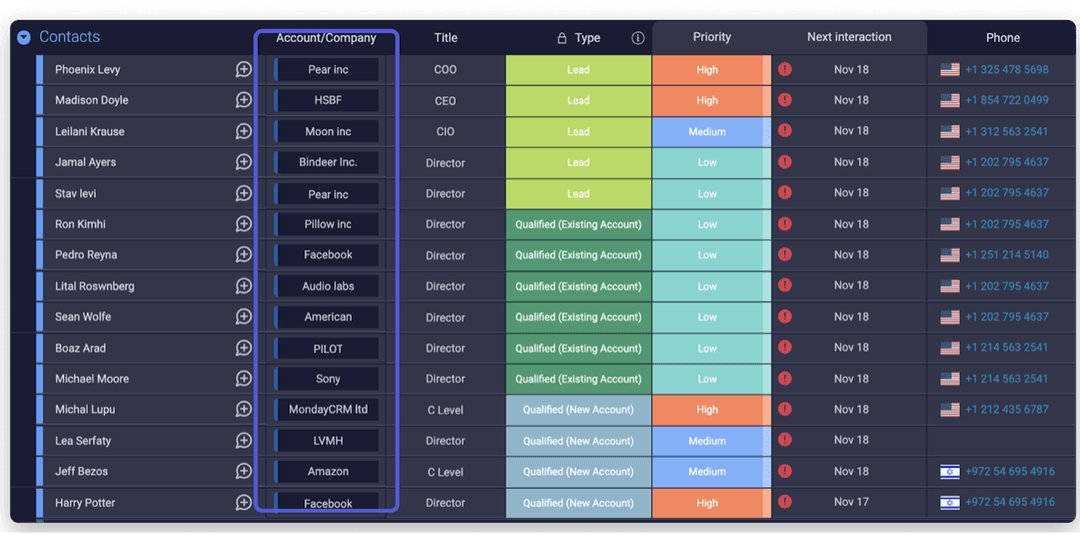
monday CRM contact board

CRM software is intended to simplify creating client profiles and tracking customer interactions. This image shows the contact board in monday CRM, complete with each contact’s company, title and phone number, along with their priority, their company’s lead type and the date of their next scheduled interaction with your business. (Source: monday.com)

At Business News Daily, we’ve spent years researching and testing the technology that enables entrepreneurs to accomplish their goals and scale their businesses more efficiently. Our team of small business tech specialists conducts independent evaluations of the best technology platforms to determine which best meet the needs of small business owners. We also regularly consult with technology experts, including IT professionals, developers, implementation specialists and cybersecurity professionals, to stay on top of the latest tech trends impacting small businesses. And every review we publish is evaluated by our editorial staff to ensure objectivity, accuracy and fairness are at the core of our decision-making. Learn more about our editorial guidelines.

How We Decided

To determine our picks for the best CRM software, our team of small business experts spent dozens of hours attending live demonstrations, conducting meticulous research and testing software firsthand. We examined pricing and plans to ensure there were options suitable for small businesses’ budgets, and then we got to work testing out the most important features CRM software has to offer. These...

Read MoreRead More

To determine our picks for the best CRM software, our team of small business experts spent dozens of hours attending live demonstrations, conducting meticulous research and testing software firsthand. We examined pricing and plans to ensure there were options suitable for small businesses’ budgets, and then we got to work testing out the most important features CRM software has to offer. These included automated workflows, alerts and notifications, tools to monitor deal rot and integrations with marketing software. We also examined customer reviews to get an idea of how real small businesses used each CRM platform and how their experiences lined up with our testing.

65

considered

25

reviewed

12

selected

To determine our picks for the best CRM software, our team of small business experts spent dozens of hours attending live demonstrations, conducting meticulous research and testing software firsthand. We examined pricing and plans to ensure there were options suitable for small businesses’ budgets, and then we got to work testing out the most important features CRM software has to offer. These included automated workflows, alerts and notifications, tools to monitor deal rot and integrations with marketing software. We also examined customer reviews to get an idea of how real small businesses used each CRM platform and how their experiences lined up with our testing.

65

considered

25

reviewed

12

selected

The CRM software market is evolving fast, and what has changed most since we last updated this guide is what a CRM does once your data is in it. Every platform below now includes some form of AI that goes beyond reporting analytics. These AI features draft follow-up messages, flag deals that have gone quiet and, in a few cases, place calls and log the summaries automatically. The key buying questions are no longer only which system stores your contacts best, but which one takes the most work off a small team’s plate, and what that costs once the AI is actually running at scale. Our guide and reviews below will help you choose the right CRM system for your team and budget.

Compare Our Best Picks

BND Ribbon
Our Top Picks for 2026
HubSpot CRM
Pipedrive
Zoho CRM
HoneyBook
Freshsales CRM
NetSuite CRM
Salesforce CRM
monday Sales CRM
Rating9.3/108.3/109.2/108.3/109.4/109.3/109.5/109.5/10
Best For

Integrations

Visual Sales Pipeline

Remote Teams

All-in-One Solution

Communications

E-Commerce

Small Business

Project Management

Pricing Tiers

$10 per month per user (free for up to two users)

$14 per month per user

$14 per month per user (free for up to three users)

$29 per month, flat rate

$9 per month per user (free for up to three users)

Custom Quote

$25 per month per user (free for up to two users)

$12 per month per user

Free Trial

14 days

14 days

15 days

30 days

21 days

None

30 days

14 days

Contract terms

Monthly or annual; annual commitment required on Professional and Enterprise

Monthly or annual

Monthly or annua

Monthly or annual

Monthly or annual

Annual commitment required

Monthly on Starter Suite; annual commitment required on all higher editions

Monthly or annual

Automation tools

Email automation, lead scoring, marketing automation, pipeline automation, sequences, social media automation, task automation, workflows, Breeze AI agents

Activity automation, deal automation, email automation, workflow automation, AI sales assistant

Approval process, assignment rules, blueprints, email automation, marketing automation, sales signals, workflow rules, Zia AI assistant

Email automation, follow-up automation, payment reminders, questionnaire automation, task automation, AI automations builder

Auto-assignment rules, contact scoring, deal insights, Freddy AI, sales sequences, territory management

Approval routing, custom workflows

Approval processes, flow builder, process builder, workflow rules, Einstein AI, Agentforce agents

Board automations, custom automations, email automation and sequences, notification automation, AI agents for outreach calling, lead sourcing and meeting prep

Security features

Data backup, GDPR compliance, role-based permissions, single sign-on, SOC 2, SSL encryption, two-factor authentication

AES-256 encryption, GDPR compliance, IP restrictions, role-based permissions, SOC 2 compliance, two-factor authentication

Audit logs, data encryption, GDPR compliance, IP restrictions, ISO 27001, SOC 2, two-factor authentication

Data encryption, GDPR compliance, payment security, role-based access, secure file storage, SSL encryption

Data encryption, GDPR compliance, IP whitelisting, ISO 27001, SOC 2, two-factor authentication

Advanced security, audit controls, data encryption, ISO 27001, role-based access, SOC 1/2

GDPR compliance, ISO 27001, multifactor authentication, Shield platform encryption, single sign-on, SOC 1/2/3

Audit logs, data encryption, GDPR compliance, HIPAA compliance on Ultimate, ISO 27001, SOC 2, two-factor authentication

Customer support

Email and in-app chat on Starter; phone support added on Professional and Enterprise

Live chat, with extended phone support hours on Ultimate

Email, phone and live chat, plus remote assistance; 24/7 with premium support plans

24/7 email and live chat, seven days a week; priority support on Premium

24/5 phone, email and chat support

24/7 ticketing plus self-service resources; premium support tiers cost extra

Knowledge base, Trailhead and the Trailblazer Community; 24/7 phone support via the Premier Success Plan add-on

24/7 email and chat support on all plans; prioritized queue on Ultimate

Review Link
Scroll Table

Our Reviews

Hubspot company logo
Editor's Rating: 9.3/10
Visit Site
Links to HubSpot CRM

With thousands of integration capabilities in its marketplace, HubSpot’s Customer Platform CRM is a great option for sales teams looking to improve their performance by centralizing data from their entire tech stack. Businesses can connect third-party tools to sync and clean customer data, making sure they’re drawing from one source of truth across all workflows. HubSpot’s AI handles repetitive tasks like populating contact information, fetching CRM data, drafting follow-up emails and generating weekly reports. This allows sales representatives to focus on driving sales and delighting customers.

hubspot contacts

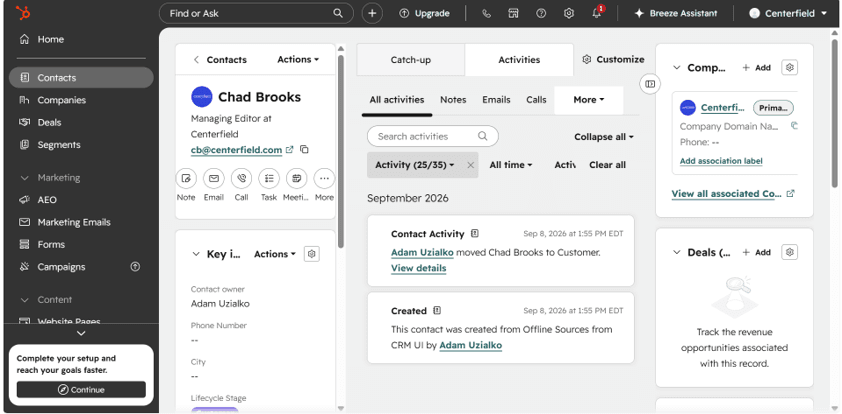
Creating contacts in HubSpot is as easy as filling out a few fields and assigning an owner. The activity tab shows recent activity with a given contact, though we had none in the example above since we just set up this contact. You can also import your entire email list from Gmail, Outlook, or a spreadsheet.

We like how HubSpot offers a forever-free plan with several report templates available for customized dashboards, giving small businesses a free option to get started with the platform’s core features. We particularly appreciate that it gives users access to not only sales tools but also essential marketing, content management and e-commerce functionality, as well as some of HubSpot’s AI features. The affordable Starter plan offers further customization, automation and email marketing tools to help you launch a new business online or streamline an existing one.

One development worth understanding before you commit is that HubSpot’s integrations increasingly run in both directions. Its AI layer, Breeze, now includes agents that pull from connected systems rather than just syncing with them. For example, a prospecting agent that researches leads and drafts outreach, or a data agent that answers questions about your customers by reading across your CRM, call recordings and the web. The practical benefit for a small team is that the value of HubSpot’s marketplace is no longer just tidier records—it’s that the AI has more to work with. The catch is that these agents draw on HubSpot Credits, a metered pool that resets monthly, so the more your integrations feed the AI, the more attention you will need to pay to usage.

HubSpot’s CRM is priced separately from its Sales Hub, but the two work effectively together. Here’s a breakdown of the costs for each, which can be used in tandem or independently of one another.

Smart CRM Pricing

PlanPriceKey features
Free$0
  • Manage contacts, companies and deals
  • Organize your pipeline
  • Sync your data
Starter$20 per seat per month
  • Core CRM records and pipelines
  • Breeze Assistant
  • Up to two deal pipelines
  • 500 HubSpot Credits
Professional$50 per seat per month
  • Custom reporting
  • Duplicate management
  • Teams
  • AI-powered data enrichment
  • Customer data management
  • 3,000 HubSpot Credits
Enterprise$75 per seat per monthEverything in Professional, plus:
  • Custom objects
  • Advanced permissions
  • Sandboxes
  • Sensitive data controls
  • 5,000 HubSpot Credits

Sales Hub Pricing

PlanPrice (annual billing)Key features
Free$0
  • Contact management
  • Deal tracking
  • Meeting scheduling
  • Basic reporting
  • Access to HubSpot’s free tools
Starter$10 per seat per monthEverything in the Free plan (with fewer limits), plus:
  • Calling
  • Basic sales automation
  • Data Agent
  • Intent signals
  • Task queues
  • Breeze Prospecting Agent
  • 500 HubSpot Credits
Professional$90 per seat per monthEverything in Starter, plus:
  • Conversation intelligence
  • Forecasting
  • Call recording and transcription
  • Advanced automation and sequences
  • AI meeting assistant
  • Predictive lead scoring
  • Sales analytics
  • Smart Deal Progression
  • 3,000 HubSpot Credits
Enterprise$150 per seat per monthEverything in Professional, plus:
  • Advanced deal and pipeline analytics
  • Lead form routing
  • Pipeline approvals
  • Custom channels API
  • AI transcript enrichment
  • 5,000 HubSpot Credits

At the time of this review, HubSpot was running a promotion for the Starter Sales Hub plan at $7 per seat per month with an annual commitment.

  • You can integrate the HubSpot CRM with nearly any popular business application.
  • You can manage your website, marketing, sales, service and operations from the same bundled platform.
  • Very small businesses will find the Free Tools and Starter packages budget-friendly.
  • There is a significant pricing gap between the Starter and Professional tiers, making it less accessible for smaller businesses.
  • The number of WhatsApp conversations and SMS messages included is limited, creating an additional expense for businesses using these channels.
  • Plans are limited by the number of marketing contacts, and the AI features draw on a metered credit pool, so both can add to your bill as usage grows.

use. However, some note that they would like more customization options when it comes to reporting. HubSpot earned an 8.4 out of 10 across more than 5,500 reviews on TrustRadius.

Pipedrive logo
Editor's Rating: 8.3/10
Visit Site
Links to Pipedrive

Pipedrive is our pick for the best CRM software for visual sales pipelines because it allows users to see all deal updates at a glance on a kanban-style pipeline and manage opportunities with a simple drag-and-drop tool. Deals that have been idle for a while are clearly marked in red, allowing sales representatives to easily spot the issue and ensure that no valuable leads slip through the cracks.

Pipedrive workflow

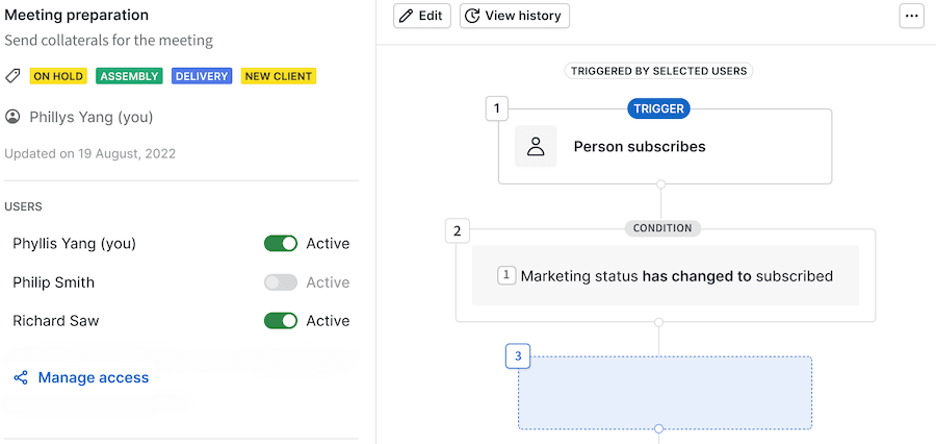
Pipedrive allows users to create workflow automations using a visual editor and a trigger-condition-action formula. (Source: Pipedrive)

Pipedrive’s highly visual dashboards are also straightforward to customize, and leads and deals can be easily filtered to zoom in on the needed data. Businesses that rely on subscriptions will also appreciate the platform’s ability to track recurring revenue. With customizable pipelines and fields, you can optimize your existing workflow systems and improve processes across departments. Pipedrive also helps you engage with customers and team members on the go, thanks to its powerful mobile app.

Since our last review, Pipedrive consolidated its lineup from five plans to four. The Lite plan buys you the visual pipeline that makes Pipedrive worth choosing, but it has no workflow automation, no full email sync and no forecasting, so most teams that get real value from the platform end up on Growth. We would rather Pipedrive put a modest amount of automation in its cheapest tier, because a pipeline that shows you a stalled deal but cannot nudge it for you is only doing half the job.

Subscription PlanPriceFeatures and Tools
Lite$14 per month per user when charged annuallyLead, calendar and deal management, unlimited pipelines, AI-powered reports, custom fields, more than 500 integrations, personalized onboarding
Growth$39 per month per user when charged annuallyAll Lite features, plus automation builder, nurturing sequences, two-way email sync, templates and tracking, mass emails, subscriptions and forecasts, meeting scheduler
Premium$59 per month per user when charged annuallyAll Growth features, plus lead generation, routing, custom scoring, contracts, e-signatures, AI-powered email tools, opportunity alerts, enhanced customization
Ultimate$79 per month per user when charged annuallyAll Premium features, plus advanced security rules and alerts, phone and email data enrichment, sandbox testing, extended phone support hours, increased usage limits

Pipedrive also sells five add-ons on top of any subscription, including LeadBooster for lead capture from $32.50 per company per month, Campaigns for email marketing from $13.33, and Projects for Kanban-style project tracking from $16 per user per month.

  • Pipedrive is a sales-focused CRM specifically designed to grow your business from your sales funnel.
  • The platform can automate routine tasks and administrative work to let you focus on closing more sales.
  • The AI tool picks up on key opportunities for improvement and potential risks, providing performance recommendations, suggested actions and highlighted at-risk deals.
  • Many key features — like advanced reporting, two-way email syncing and team goals — are unavailable without a higher-tier plan.
  • A lot of important tools, including custom fields, reports and deals, have user limits that could effectively force businesses into a more expensive package.
  • Pipedrive lacks some marketing and commerce features that we found in competing CRMs, and there is no free plan at all — only a 14-day trial.

Pipedrive customers often praise the company for its marketing automation features, as well as its overall platform. However, some complain about its third-party software integrations and its poor ability to interact with social media platforms. Pipedrive earned a 7.9 out of 10 on TrustRadius.

Zoho CRM logo
Editor's Rating: 9.2/10

Businesses with hybrid or remote employees need a CRM system that makes it easy for your sales, marketing and customer service teams to share information, gather insights and successfully nurture leads into loyal customers. That’s where Zoho CRM shines, supporting your sales communication and lead generation across all channels and locations. We love how Zoho connects employees and keeps them on the same page, whether they’re in the same office or not. The platform’s integration with communication tools like Microsoft Teams and Google Chat makes it easy for remote team members to share updates and reports so they can make informed decisions and move a sale forward.

Zoho CRM dashboard

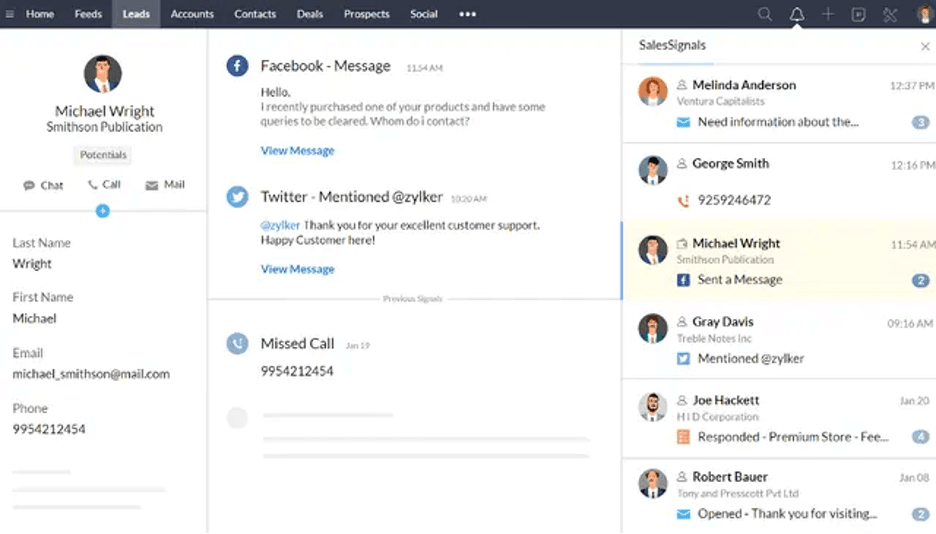
We like how Zoho CRM’s dashboard consolidates all client communications in one place so that you can see the latest conversations at a glance. Source: Zoho

Zoho’s user-friendly interface and extensive onboarding resources make it simple to get started, so you and your team can hit the ground running without a steep learning curve. Another aspect we really appreciate is how Zoho brings all your sales communication channels (email, phone, chat, social media) into one place and notifies you of any mention or update, ensuring you can stay on top of all customer communication and take immediate action when needed. Additionally, Zoho’s built-in AI assistant, Zia, analyzes patterns in your sales activity and customer behavior to provide in-depth analytics and help streamline workflows, sales communication and data input.

For distributed teams specifically, the detail we keep coming back to is Zoho’s pricing relative to what it does. A remote team is often the kind of business that cannot justify an enterprise contract but still needs several people in the same system with real permissions and audit trails behind them. Zoho’s Standard plan at $14 per user gets a small distributed team onto shared pipelines and dashboards for less than most competitors charge for their entry tier, and the free plan supports three users indefinitely, which is enough for a founder and two colleagues to run properly rather than working out of a spreadsheet. The trade-off, as below, is that Zia and the deeper customization sit further up the ladder.

Subscription PlanPriceFeatures and Tools
FreeFree for up to three usersBasic lead and deal management, automated workflows, standard reports, email campaigns, one sales pipeline, 1GB file storage, mobile app
Standard$14 per month per user when charged annuallyAll Free features, plus 250 mass emails daily, lead scoring, multiple pipelines, sales forecasting, custom fields and reports, 1GB file storage plus 512MB per user, marketplace integrations
Professional$23 per month per user when charged annuallyAll Standard features, plus 500 mass emails daily, custom links, unlimited custom list views, workflow blueprints, quote management, inventory management, real-time notifications, Google Ads integration
Enterprise$40 per month per user when charged annuallyAll Professional features, plus 1,000 mass emails daily, custom signals, custom modules and buttons, page layouts, Zia AI assistant, advanced analytics and customization, data encryption
Ultimate$52 per month per user when charged annuallyAll Enterprise features, plus 2,000 mass emails daily, extended feature limits, 5GB file storage plus 1GB per user, an extended 30-day free trial
  • Zoho CRM delivers a complete set of tools for sales, marketing and customer support, offering a well-rounded solution for small businesses.
  • The customization and automation features help streamline workflows, lead management and data visualization across your entire organization.
  • The Zoho Marketplace offers more than 1,000 built-in integrations, enhancing remote work efficiency and performance.
  • The Free plan lacks some key features, especially in marketing automation and data visualization.
  • Some of Zoho's standout features, like the Zia AI assistant and more advanced customization options, are locked behind higher-priced packages.
  • Some users may find the standard file and data storage allowances restrictive.

Zoho CRM earned a rating of 8.4 out of 10 on TrustRadius. Users highlight its robust organizational features, customizable functions and seamless integration with other Zoho products. Learn more in our Zoho Books and Zoho Assist reviews.

HoneyBook logo
Editor's Rating: 8.3/10

HoneyBook is a cost-effective CRM that offers a wide range of tools that not only support lead generation and nurturing but also existing client management functions, making this a valuable all-in-one solution. We like that this platform includes invoicing and payment tools, allowing businesses to forgo a separate invoicing service. In fact, HoneyBook is designed to be a one-stop shop, so you no longer need to separate tools to manage your lead pipeline, sales proposals, customer relationships, billing and other aspects of your company. Virtually all front-end and back-end operations can be conducted through this one program.

Honeybook sales leads

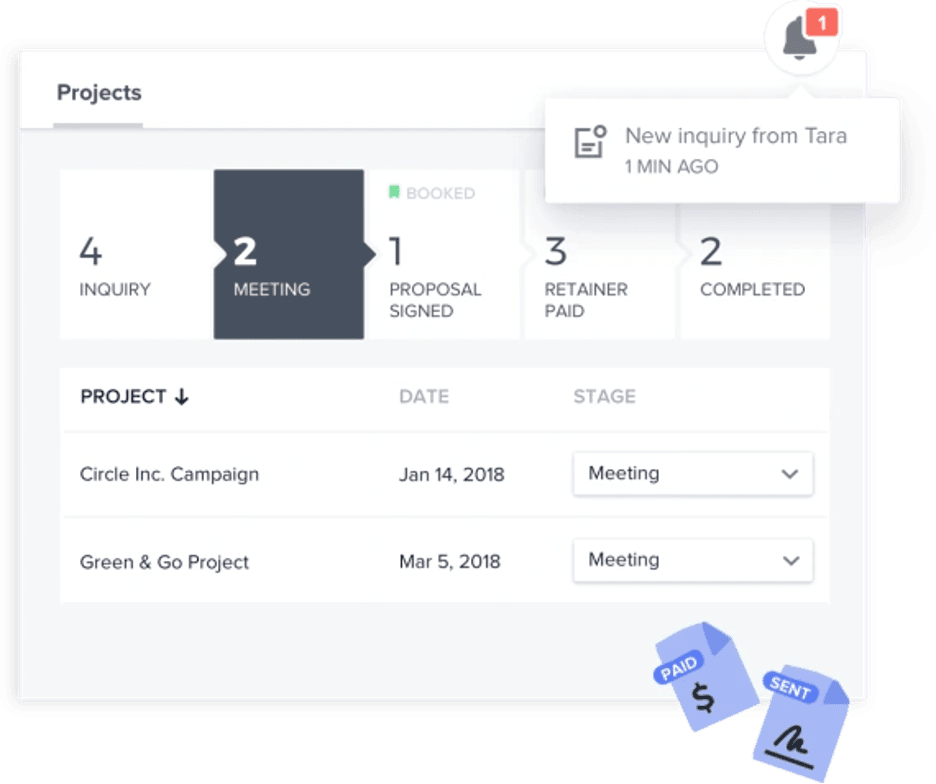
HoneyBook provides a clear look at where your leads are in the sales funnel. Source: HoneyBook

When testing the software, we especially enjoyed HoneyBook’s AI-powered automations, which make it easy to set up custom workflows and support your business’s unique sales funnel with the support of artificial intelligence. There’s no need for coding knowledge, so HoneyBook is a truly accessible tool for any entrepreneur or sales professional. Your customers will also appreciate how easy it is to use the client portal.

Two things separate HoneyBook from the per-seat platforms elsewhere on this list. The first is that it charges a flat monthly rate for the account rather than billing by user, so a solo operator pays the same as a small team on the same tier, which is unusual in this category and helpful if your headcount fluctuates. The second is that HoneyBook AI is included on every plan. Even the entry tier will draft email replies, build an automation from a plain-language description, take notes in client meetings, flag which incoming leads look most valuable and enrich new lead records on its own.

HoneyBook prices per account rather than per user, so each figure below covers your whole business at that tier. Annual billing saves up to 18 percent against the monthly rate.

Subscription PlanPriceFeatures and Tools
Starter$29 per month for one user when charged annuallyTwo live lead forms, unlimited clients and projects, invoices and payments, proposals and contracts, calendar, templates, client portal, basic reports, HoneyBook AI
Essentials$49 per month for up to two users when charged annuallyAll Starter features, plus 10 live lead forms, scheduler, automations, QuickBooks Online integration, SMS reminders, removal of the “Powered by HoneyBook” label, standard reports
Premium$109 per month for unlimited users when charged annuallyAll Essentials features, plus unlimited live lead forms, advanced reports, multiple companies, onboarding specialist, priority support

Payment processing is billed separately from the subscription. Card fees start at 2.7 percent plus 10 cents per transaction, and ACH bank transfers are charged at a flat 1.5 percent, with no international or premium card brand surcharges.

  • You can use HoneyBook to manage the entire client lifecycle, from initial contact to bill payment.
  • The software helps you build customizable, interactive proposals to share with prospects.
  • HoneyBook offers a 60-day money-back guarantee.
  • Businesses that want to give more than two employees access to HoneyBook have no choice but to sign up for the most expensive plan.
  • The helpful workflow automations aren't available with the entry-level package.
  • HoneyBook isn’t as flexible as some of the other CRM systems we reviewed, so users in need of deep customization may find it lacking.

HoneyBook earned an 8.2 out of 10 across 38 reviews on TrustRadius. This was the smallest sample size of customer reviews we found during our research, so user comments may not be representative of a broader experience. Similar to our experience testing the platform, HoneyBook users found the software’s automation capabilities among the most appealing. Others would like to see more integrations and better customer support.

freshworks CRM company logo
Editor's Rating: 9.4/10

Freshworks’ Freshsales CRM is ideal for companies that are most concerned about customer communication. This CRM system boasts built-in tools designed to optimize communications and enable you to build better customer relationships. We love that Freshsales has a basic built-in VoIP phone service with toll-free local numbers available for purchase in more than 90 countries and calling ability from any device. Email, chat and SMS tools are also available for omnichannel communications.

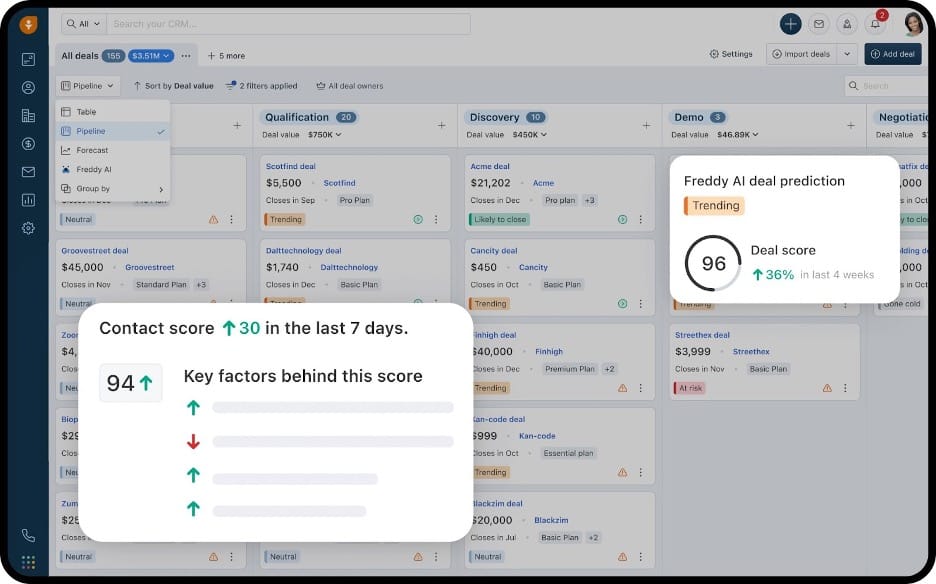
Freshsales Freddy AI

In the image above, a user navigates through the Freshsales platform and gets an alert from Freddy AI on a deal prediction. (Source: Freshworks)

Beyond the appealing communications features, Freshsales’ powerful AI assistant, Freddy, helps you develop a more comprehensive understanding of clients based on historical sales data, activities and engagement. Once you have your pipelines, workflows and forecasting tools in place, Freshsales makes it easier to serve your customers targeted products and services. From within the platform, you can run personalized bulk email marketing campaigns, manage deals, predict deal performance, forecast revenue and strategically engage with prospects. The CRM can also automatically build prospects’ contact profiles, spot rotten deals and reawaken cold leads that still have potential.

What still sets Freshsales apart on the communications front is that the phone is built in rather than bolted on. Most CRMs on this list expect you to connect a separate telephony provider, which means another vendor, another bill and another integration to maintain. Freshsales includes a dialer on every plan, including the free one, so a three-person team can make and log calls from the same place they track deals without paying anything. That is a meaningful head start for businesses that sell over the phone. Do note that Freddy AI’s agent capabilities are sold separately from the plan tiers, so the AI-assisted side of those conversations is an additional cost.

Subscription PlanPriceFeatures and Tools
FreeFree for up to three usersDeal management, visual sales pipelines, Kanban boards, email templates, built-in phone service, chat widget, mobile app
Growth$9 per month, per user when charged annuallyAll Free features, plus contact lifecycle stages, custom fields, basic workflows, product catalog, curated reports, 1 CPQ license, Freshbooks Marketplace
Pro$39 per month, per user charged annuallyAll Growth features, plus contact scoring, sales emails and deal insights by Freddy AI, custom sales activities, sales sequences, territory management, multiple sales pipelines, custom reports, advanced workflows, auto assignment rules
Enterprise$59 per month, per user charged annuallyAll Pro features, plus forecasting insights by Freddy, custom modules, audit logs, developer sandbox

Branded Documents, Freshworks’ quote and proposal tool, is an add-on at $19 per user per month, and the Freddy AI Agent is sold separately starting at $49 per 100 sessions.

  • The Freshsales Pro and Enterprise plans include AI-powered tools from Freddy AI that provide actionable insights across the entire customer journey.
  • The built-in VoIP phone service isn’t a common feature in CRM systems, and it’s included even on the free plan.
  • You can manage global transactions with over 150 currencies and multiple language support.
  • Freshsales' phone system is lacking in cloud-based call management features.
  • You'll have to pay for extra bot sessions (defined as any single interaction between a user and a chatbot) if you go over your limit.
  • There’s no discounted rate for purchasing a large number of seats, and customer support runs on weekdays only, even for Enterprise subscribers.

Freshsales customers often praise the company for its sales sequences and customizations. However, some note that the interface could be a little more intuitive and user-friendly. Freshsales earned an 8.1/10 on TrustRadius.

NetSuite logo
Editor's Rating: 9.3/10

Oracle NetSuite’s CRM is our top pick for businesses looking for the best CRM system for e-commerce operations. The range of built-in tools for website management is impressive, letting you manage customer relationships, keep customer service consistent, and track leads from initial inquiry to sale and beyond, all from one dashboard. You can use NetSuite — a feature-packed enterprise resource planning (ERP) platform with a native CRM system — to build B2B or B2C e-commerce stores that are easy to manage, customer-friendly and fully connected to the rest of your business.

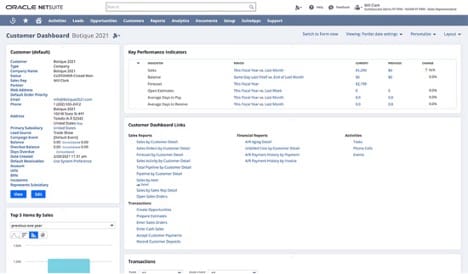
Oracle NetSuite customer dashboard

NetSuite provides a wealth of information on clients across all organizational departments. In this image, a user can see a customer dashboard providing customer contact information, KPIs and links to more in-depth information. (Source: Oracle NetSuite)

Every customer interaction is recorded so staff always have the full picture, including order history, website activity, emails, calls and support cases, all in one timeline. With this knowledge, sales representatives can follow up with context and confidence, and service staff can resolve issues without asking customers to repeat themselves. As companies grow, they can add NetSuite modules for inventory, fulfillment, finance, HR and other core business operations, so they can run their entire business through one software solution.

The reason we keep NetSuite on a small business list despite its cost is specific to e-commerce. An online store generates operational problems that a standalone CRM cannot solve. When a customer emails about a delayed order, the useful answer lives in inventory and fulfillment data, not in the CRM record. NetSuite is one of the few platforms here where the customer timeline and the stock ledger are the same system, which is why it wins this use case. That said, it is the most expensive option on this page by a wide margin, and it is worth being honest that most small businesses selling online will be better served pairing a cheaper CRM with their existing store platform until the operational complexity actually demands otherwise. Mid-size businesses and those planning to grow quickly to enterprise scale may find the investment worthwhile, however.

We were disappointed that Oracle NetSuite doesn’t publish its pricing online. This lack of transparency makes it harder for business owners to determine whether the platform fits their budget. NetSuite charges for setup, use of the platform, the modules you want and the number of users, and you won’t know an exact cost until you reach out for a custom quote.

Our research indicates the base platform starts at roughly $999 per month, with full user licenses running $129 to $199 per user per month on top. Our research indicates that Oracle raised the floor on full user licenses since our last review, so businesses renewing an older contract should expect an increase. Lighter self-service seats cost considerably less, and matching staff to the cheapest license that covers their job is the single biggest lever on what you pay. Either way, NetSuite is the most expensive system we evaluated.

  • Oracle NetSuite is a market-leading ERP system with a highly capable CRM system built in, giving businesses access to tools well beyond sales and marketing features.
  • The platform's analytics tools track a variety of metrics to assess company performance.
  • The integrated NetSuite ecosystem lets you scale business operations without switching systems or duplicating data.
  • The SuiteCommerce module costs extra, as do useful tools like the CPQ functionality.
  • Prices aren't available on NetSuite's website, making cost comparisons with rival CRM platforms difficult.
  • ERP systems like NetSuite are complicated and take a long time to implement, and there is no free trial to test the platform first.

Oracle NetSuite customers often praise the company for its customization options, reporting and analytics, and logistics capabilities. However, some users state that it’s hard to get the system to work the way they want without coding support, navigation is sometimes too complicated, and the interface, although intuitive, looks dated. NetSuite earned an 8.1 out of 10 on TrustRadius based on over 1,200 reviews.

Salesforce company logo
Editor's Rating: 9.5/10

Salesforce is our pick for the best CRM for small businesses because it offers an all-in-one sales, marketing and e-commerce solution with everything smaller organizations need to attract in-person and online customers and drive sales. On top of the robust tools, companies will benefit from the workflow builder, which can automate every task your team performs repeatedly. We also love that Salesforce’s native Slack integration — one of thousands on its AppExchange — allows users to effortlessly search, share and update CRM data from the popular communication tool, pull up information while on a call and launch entire workflows.

Salesforce analytics

Salesforce’s customizable “Home” dashboard, pictured above, offers an overview of your most important metrics, including new leads, opportunities and recently added contacts. (Source: Salesforce)

Salesforce also boasts some of the most impressive AI-powered tools on the CRM market. Einstein, the company’s AI assistant, works off natural language queries and can auto-generate personalized emails, analyze customer conversations, summarize CRM data, score leads, forecast sales and more. The Generative Canvas feature visualizes data as graphs and tables and builds reports. Perhaps most notably, Salesforce’s Agentforce works as an autonomous agent that can answer customer questions in a conversational manner, reach out to the most promising prospects and coach your sales reps with real-time call feedback.

One important caveat for the small business reader, given how heavily Salesforce now markets its AI: the company has rebranded Sales Cloud as Agentforce Sales, but the Agentforce agents themselves do not unlock until the Enterprise edition at $175 per user per month. The two suites a small business would realistically buy — Starter at $25 and Pro at $100 — include Einstein activity capture and the generative assistant, which are useful, but not the autonomous agents. If agentic AI is the reason you are considering Salesforce, price the Enterprise tier before you fall for the entry point. There is also now a free tier for up to two users, which is worth knowing about if you simply want to try the platform properly.

Subscription PlanPriceFeatures and Tools
Free SuiteFree for up to two usersCore account, contact, lead and opportunity management, basic pipeline tracking, Salesforce mobile app access
Starter Suite$25 per month per user when charged monthly or annuallyLead, account, contact and opportunity management, customizable sales process, task management, email marketing, Einstein activity capture, customizable reports and dashboards, products and price books, case management, per-user data and file storage, customizable layouts
Pro Suite$100 per month per user when charged annuallyAll Starter features, plus forecast management, quotes, orders, contracts, Salesforce Meetings, Chatter, limited flow builder, app builder, AppExchange, developer sandbox
Enterprise$175 per month per user when charged annuallyAll Pro features, plus advanced pipeline management, deal insights, Einstein Conversation Insights, Agentforce access, unlimited flow builder, approval processes, web API, data sync
Unlimited$350 per month per user when charged annuallyAll Enterprise features, plus sales engagement, lead scoring, Einstein predictive forecasting, full sandbox
Agentforce 1 Sales$550 per month per user when charged annuallyAll Unlimited features, plus full AI suite, unmetered Agentforce usage, sales planning and programs, incentive compensation management, Slack Enterprise, Tableau Next
  • Salesforce's scalable CRM systems mean this solution can grow with your company.
  • The generative and predictive AI tools are integrated across the entire platform and help support sales, marketing and service teams.
  • Salesforce’s range of price points allows small and larger businesses alike to access its market-leading features, and a free tier is available for very small teams.
  • Larger businesses may have to pay additional fees to use Salesforce integrations effectively.
  • Most Salesforce plans require an annual commitment, and only Starter Suite can be billed monthly.
  • It can be difficult to get immediate technical assistance during non-business hours unless you pay for the Premier Success Plan.

Salesforce users across the board largely praise its CRM for the integrations, ease of setup and customizable reports. However, some have complained about the lack of functions included in the lower-tier plans and how the higher-tier editions can be pricey for smaller businesses. Salesforce earned an 8.7 out of 10 on TrustRadius.

monday sales CRM logo
Editor's Rating: 9.5/10

The monday CRM is the ideal solution for businesses seeking a CRM system heavily influenced by project management functionalities. The core work management platform provides key timesaving and organizational capabilities, such as easy-to-use interfaces and unlimited boards to organize projects. Whether you need a custom dashboard for specific communication needs or want to delve into sales analysis with customer data visualization tools, the monday CRM offers intuitive technology to support your success.

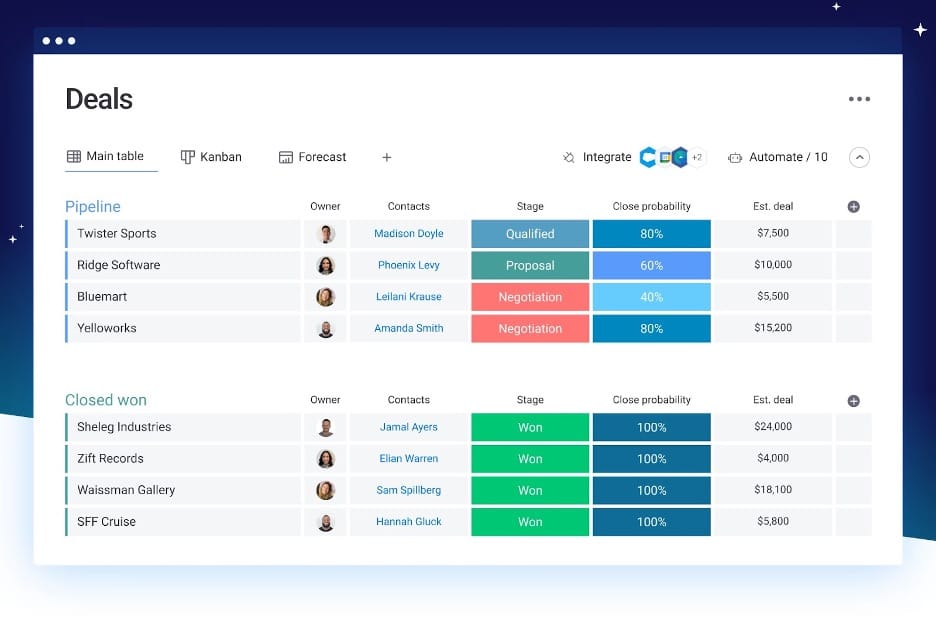
monday CRM Deals dashboard

In the image above, a user views the monday CRM’s “Deals” dashboard, showing projects currently in the pipeline and deals closed and won. There are also at-a-glance details about each individual deal. (Source: monday.com)

We also found that this CRM stands out in its intentional design and ability to run and scale to any workflow. Monday is also highly customizable, monitors omnichannel communication across your contacts and facilitates marketing campaigns. We appreciated that integration with communications platforms like Slack eliminates the need for regular status update meetings by automatically alerting team members when a project or task is ready for further action.

Monday has also pushed AI agents into the platform since we last tested it, and they suit the project management angle better than they do a conventional CRM. From the Standard plan up you get an outreach caller agent that qualifies leads and writes its call summaries back to the board, a lead sourcer agent that finds and enriches prospects matching your target profile, a meeting prep agent that briefs you before each customer call and an AI notetaker that turns those conversations into assigned tasks. Pro subscribers can chain agents together with the AI workflow builder. Because monday treats a deal as a project with owners and due dates rather than a record in a database, agent output lands where work already gets tracked, which is the whole reason to choose this platform over a pure sales CRM.

Subscription PlanPriceFeatures and Tools
Basic$12 per month per user for three users when charged annuallyUnlimited customizable pipelines, unlimited contact databases, unlimited boards, kanban view, templates, web forms, customizable notifications, 5GB file storage
Standard$17 per month per user for three users when charged annuallyAll Basic features, plus advanced account, contact and deal management, two-way email sync, AI agents for outreach calling, lead sourcing and meeting prep, AI notetaker, Sidekick AI assistant, activity management, timeline, calendar and map views, limited custom automations and integrations, 20GB file storage
Pro$28 per month per user for three users when charged annuallyAll Standard features, plus the AI workflow builder, sales forecasting, email tracking, sequences, quotes and invoices, sales analytics, chart view, expanded custom automations and integrations, 100GB file storage
UltimateCustom quoteAll Pro features, plus lead scoring, team goals, advanced analytics, account management, client projects, HIPAA compliance, maximum custom automations and integrations, advanced security and governance, 24/7 prioritized support, white-glove migration

Note that monday renamed its top CRM tier from Enterprise to Ultimate.

  • Monday CRM users have access to unlimited boards to organize projects, clients and processes.
  • The workflow automations are especially easy to build and deploy.
  • All plans include 24/7 customer support via email and chat.
  • Monday CRM has a three-seat minimum for all plans, and seats are sold in fixed blocks rather than one at a time.
  • Automations are limited to a set number of actions per month, depending on your package.
  • Monday lacks some of the wider integration support for third-party tools that some of its competitors boast.

Monday users often praise the company for its team collaboration and task management features, as well as its wealth of automations. However, some complain that scalability can be difficult at times. Monday earned an 8.3 out of 10 across more than 5,000 reviews on TrustRadius.


What Is CRM Software?

CRM, or customer relationship management, software is a computer program that can help your sales teams log communications with potential and existing customers, manage leads and sometimes build marketing campaigns. In other words, a CRM allows you to foster and maintain relationships with your customers.

Businesses use CRM software for various reasons. Initially, the CRM industry was geared primarily toward sales and PR professionals, offering a convenient way for them to store information and track communications with prospects and customers. Today, CRM solutions straddle several areas, such as marketing, analytics, communications and light project management. Some CRM systems even have built-in chatbots and calling capabilities, letting your team communicate with clients directly from the platform.

Organizations that need a digital way to manage their customer pipeline, nurture client relationships, and coordinate between their sales and marketing teams use CRM systems. Usage spans sectors, from retail businesses to service companies and across both B2B and B2C enterprises.

What Are the Benefits of CRM Software?

Zendesk app directory

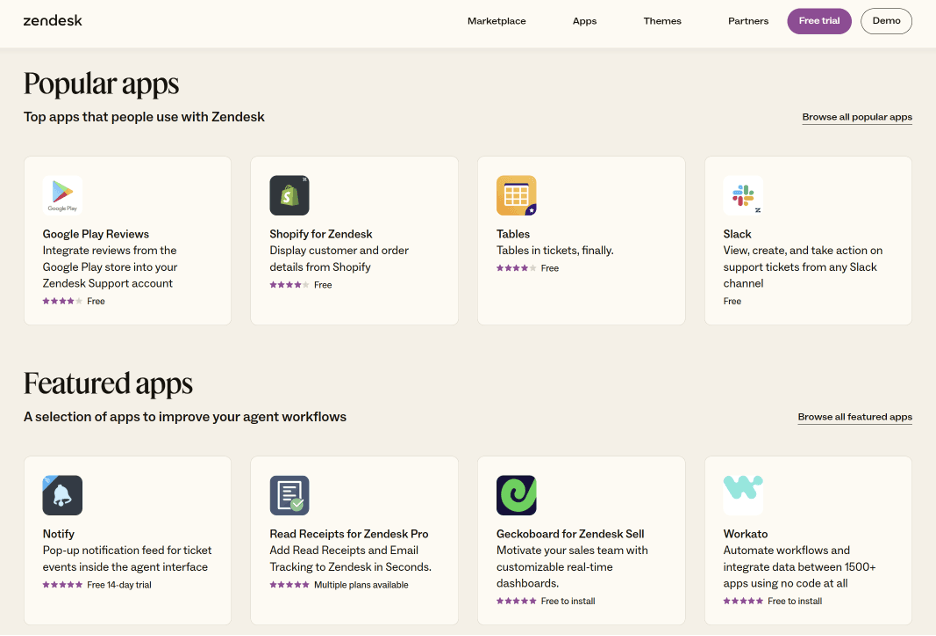
Many CRM platforms come with native app integrations to extend their functionality and provide support for users’ preferred tools. Pictured is a view of Zendesk’s app directory, which features integrations with a range of popular external applications. (Source: Zendesk)

CRM software provides a central digital location where your employees can log all customer communications, track sales deals and build marketing campaigns. This offers businesses a range of abilities and advantages. Below are some of the top benefits of using a CRM.

  • Organize and maintain customer information. CRM software is ideal for companies that rely on up-to-date data to service their customers. This is the most basic yet essential benefit that CRM software can provide for your business — an easily accessible database of customer information.
  • Streamline and scale your sales cycle. With the data you collect via your CRM system, you can streamline your sales process and cut unnecessary steps. As the program tracks sales behavior and outcomes, you’ll see which types of communication work and which don’t. When you need to expand your sales process, a CRM solution can help with that, too.
  • Build customer relationships. CRM software helps your team engage and build lasting connections with potential and existing customers. Using the data stored in your CRM, your team can track customer information and tailor their interactions to meet each client’s unique needs and preferences.
  • Automate your workflows. CRM software automates data entry and administrative tasks, allowing your team to focus on building meaningful customer relationships. CRM workflow automation also minimizes the potential for human error and makes your business operate more efficiently.
  • Forecast your sales. CRM software allows you to predict future sales based on past sales data. Sales reports generated by your CRM and the insights you glean from them are valuable for companies that want to project future needs and costs.
  • Delegate routine work to AI agents. The newest benefit, and the one changing fastest, is that CRMs increasingly act on your behalf rather than just recording what happened. Depending on the platform, an agent can research a new lead and draft the outreach, place and summarize a qualifying call, brief you before a client meeting or turn that meeting into assigned tasks. For a small team without dedicated sales operations support, this is where the hours come back.

How Much Does CRM Software Cost?

Most CRM software is priced on a per-user, per-month basis. Many businesses opt for annual billing to simplify the payment process and save money, as most CRM vendors reduce their monthly rates for clients who pay annually.

With that in mind, these are the general subscription costs you can expect when shopping for a CRM system:

  • $0: Free CRMs are worth considering for brand-new businesses and independent contractors getting started with this type of platform. Most free plans include a very limited set of CRM features and user accounts — typically two or three seats. Ultimately, they can be a good way to learn how to organize customer outreach and begin using modern sales tools, but they’re not a long-term solution for most businesses.
  • $10 to $15: Inexpensive CRMs are a great option for tiny businesses with modest needs. Affordable systems like these don’t usually require much in-house tech support to implement the platform. If you want a fast CRM solution with just the essential tools and minimal hassle, this price range is a great place to find one. Just make sure the storage options meet your needs, as low-cost CRM software usually has caps on the number of customer records you can store.
  • $20 to $60: For features beyond the basics and a broader range of integrations with third-party systems, a CRM in this range per user per month will likely meet your needs. The majority of CRM software we reviewed falls into this bracket because these plans are designed to meet the needs of small and medium-sized businesses. As you consider platforms at this cost, check for limitations on the number of supported users and storage caps that could force you to upgrade to higher-priced plans.
  • $100 to $200: CRM software at this level per user per month is typically aimed at larger businesses or at teams that need the AI and automation features vendors reserve for their upper tiers. Salesforce, for instance, does not unlock its autonomous Agentforce agents below $175 per user per month. Solutions in this range often include options to integrate with legacy systems and allow greater customization than less expensive CRM software. As powerful as they are, systems like these are not necessary for most small businesses.
  • $350 or more: The most high-end CRM systems now list at $350 to $550 per user per month, and their vendors often provide extensive training, customization and implementation services alongside the software, with expenses reaching thousands of dollars. Enterprise resource planning platforms with CRM built in, like Oracle NetSuite, sit in similar territory once you add the base platform fee to per-user licenses.

CRM providers usually break down their services into packages with varying features and costs. For example, a vendor may have multiple plans that range in price from $20 to $60 per user per month based on the tools included. Beyond this monthly subscription cost, there may be fees for additional users, more records, implementation, custom onboarding and phone support. Some vendors also offer add-on services (like Pipedrive’s lead-boosting tool) that, while appealing and valuable, can increase your expenses.

Key takeaway: AI is becoming its own line item. Several vendors now include a monthly allowance of AI actions with each seat and charge for anything beyond it — HubSpot sells credits, Salesforce meters Agentforce usage, and Freshworks prices its Freddy AI Agent by the session. Because these costs scale with how much work the AI actually does, a successful rollout can raise your bill rather than lower it. Ask any vendor what a typical month of overage looks like for a business your size before you sign.

Did You Know?Did you know
Most CRM services offer free trials for new customers, so you can test-drive the system of your choice without the risk of sinking money into a product that ultimately doesn’t work for you.

Free CRMs

A free CRM may be the best option if you run a very small business or have significant budget restraints. However, there are limitations to keep in mind as you compare cost-free solutions. Here are the best free CRM systems available in 2026 and their limitations:

CRM ProviderUser LimitContact/Record LimitKey FeaturesMain Limitations
HubSpotUp to 2 users1,000 contactsCRM features, email marketing, app marketplace integrations, AI-powered analytics, basic reportingLimited users, basic automation only, HubSpot branding on emails
Zoho CRMUp to 3 users5,000 recordsLead and deal management, automated workflows, standard reports, mobile app, email campaignsRecords include all data types, limited integrations, basic support only
FreshsalesUp to 3 usersUnlimitedVisual sales pipelines, email templates, built-in phone and live chat, deal managementLimited reporting, no advanced automation, basic customization only
SalesforceUp to 2 usersNot publishedAccount, contact, lead and opportunity management, basic pipeline tracking, mobile appVery limited seats, no automation or AI agents, upgrade required for reporting depth

How to Choose CRM Software

Not all CRM software is created equal. The steps below will help you choose a CRM system that suits your business and integrates seamlessly into your existing workflow.

1. Set a budget.

CRM costs range from free to more than $500 per user per month at the top of the market, so it’s best to set your budget before you start shopping. Consider how much you can realistically afford to spend each month for this continuing service. As you search the market, eliminating CRM software outside your price range will help you narrow your options before drilling down into feature sets and service plans.

2. Make a feature list.

The number of tools and functions in even the most basic CRM system can be overwhelming. For clarity, list the CRM features you must have and those that would be nice to have but aren’t crucial. This is a good time to survey employees in your company who will use the CRM. They may recommend features you hadn’t thought of or cross off ones you thought they would need.

3. Gather referrals from businesses like yours.

In a crowded sales technology market, choosing the right CRM can be daunting. Software recommendations from people who understand the needs of your industry are invaluable. If you don’t personally know anyone who can give you a referral, reading user testimonials on independent review sites like TrustRadius can be helpful.

4. Assess the current market.

The CRM space changes rapidly as technology evolves, so high-profile solutions you’ve heard of in the past may no longer be the best choice. Small business advice websites like Business News Daily and trade publications are the best way to see what’s currently popular and what’s not. Look for recommendation guides like this one that can point you to the best products.

This step matters more than it used to. Vendors have been reshuffling their lineups quickly to package AI, which means plan names, prices and tiers you researched even a year ago may no longer exist. Zendesk, for example, announced it is retiring its sales CRM entirely to concentrate on customer service, and several vendors have renamed their top tiers or moved them to custom quotes. Always confirm pricing on the vendor’s own page before you commit.

5. Test your top choices.

At this point, you should be able to narrow down the list of possible CRM solutions for your business based on your budget, desired features, referrals and testimonials, and professional recommendations. You’ll have a sense of which CRM software has the most potential, so take each of the remaining contenders for a test drive.

Most providers offer free trials, so try as many programs as your team is interested in before spending money on a permanent solution. Vendor sales representatives are usually eager to answer any questions you have or show you a demo of their product, but remember that it’s their job to present their CRM in the best light possible. Using the platform yourself is the best way to see if the performance matches the hype.

6. Make your decision.

Once you’ve done your due diligence, it’s time to make a final selection. Which CRM checked all your company’s boxes and performed best under testing? It may take a while to arrive at this answer, but it’s time well spent on such a significant investment.

TipTip
Your chosen CRM software will be critical to your sales and marketing teams’ daily operations. Keep detailed notes as you explore various platforms and invite key team members to join demos and take advantage of free trials. Consider their feedback before making a purchase decision.

What Are Some Features of CRM Software?

When searching for CRM software, it’s important to know what kind of functionality you want and need. Here are the essential features you’ll find in most CRM systems.

Contact Management

Contact management tools allow you to collect information about your customers and build customer profiles. You can then segment customers into different client groups, identify patterns and trends across your customer base, and tailor your services accordingly. You can also use contact management features to communicate with customers and track all interactions.

Lead Management

As your business generates leads, you need ways to store and evaluate them. Lead management tools can help you develop a lead pipeline and qualify those leads. With lead scoring, you can identify which prospective customers are the most promising.

Deal Management

Your sales team will continually determine which leads to pursue, and you’ll need a way to monitor where each lead is in the sales process. Deal management features allow you to see which leads are in the closing stages and which opportunities need more effort.

Marketing Tools

The best CRM systems include marketing tools that aid sales conversion. Many programs, for example, include email templates that target prospects at different stages of the sales process or let you personalize messaging. Some integrate with social media platforms, allowing you to optimize your posts to better reach your desired audience. These features enable your marketing and sales teams to work toward shared goals. 

>> Read Related Article: How CRMs Streamline Email Marketing

AI Agents and Assistants

The feature set that has changed most since our last update is AI, and it now spans two distinct categories worth telling apart. Assistants respond to you: HubSpot’s Agent Hub, Zoho’s Zia, Freshworks’ Freddy and Salesforce’s Einstein will draft an email, summarize a call, score a lead or build a report from a plain-language request. Agents act without you: Monday’s outreach caller agent qualifies leads over the phone and logs the summary, its lead sourcer agent finds prospects matching your target profile, and HubSpot’s prospecting agent researches each lead and proposes an outreach plan.

Three questions are worth asking before you buy on the strength of an AI demo. Which plan tier do the agents actually require, since vendors frequently show off capabilities that sit two tiers above the advertised entry price? How is usage billed, given that metered AI turns a fixed subscription into a variable cost? And what review step sits between the agent and your customer — you want to be able to see and correct what it did before a prospect does.

Workflow Automation

Workflow automation features let your CRM conduct tasks without much (or any) employee involvement. For example, you could set the software up to automatically notify a sales representative whenever a customer fills out a form on your website. You can also customize triggers that send emails to clients, generate recurring reports and update customer records.

Reporting

Pipedrive insight reporting

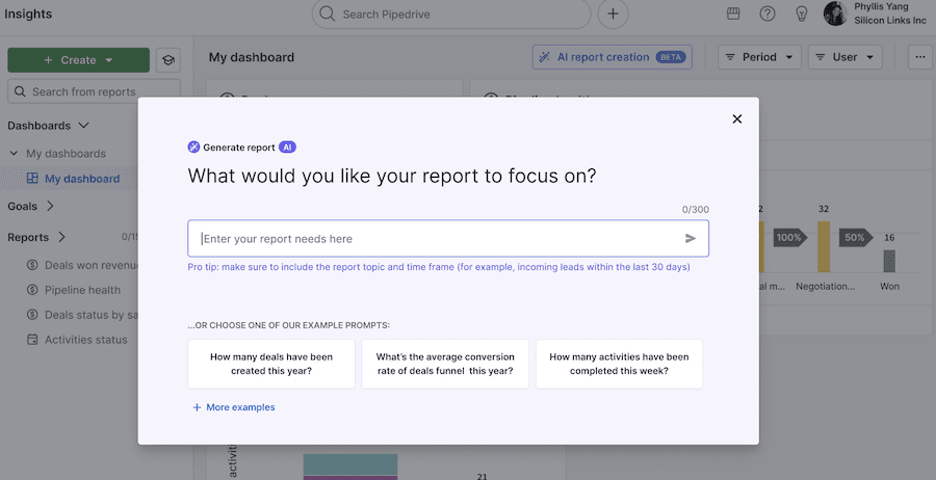
Each CRM system provides reporting and insights differently, with some tools providing greater granularity or report customization features. In the above image, a user generates a report using Pipedrive’s AI tool and selects from the provided prompt examples, including deals created within the past year. (Source: Pipedrive)

CRM reports break down your sales and marketing data to help you better understand and analyze leads, customer buying behaviors, the number of outbound calls your team makes and other vital metrics. Some CRM platforms offer more report types than others, with some allowing you to customize your CRM metrics and decide how you want the data presented, such as in bar graphs or pie charts.

What Are the Security Features of CRM Software?

Data security is a critical consideration when selecting CRM software, as these systems store sensitive customer information, including contact details, purchase histories and personal preferences. Modern CRM platforms implement multiple layers of security to protect this valuable data. Common security features in high-quality CRM software include:

  • Data Encryption: Leading CRM providers use AES-256 encryption to protect data both at rest and in transit. This ensures that even if unauthorized individuals gain access to your data, it remains indecipherable.
  • Access Controls: Role-based access control allows administrators to define user permissions and restrict access to sensitive data based on job roles. This ensures only authorized personnel can view or modify critical customer information.
  • Multi-Factor Authentication (MFA): Many CRM systems now require additional verification steps beyond passwords, such as SMS codes or biometric authentication, to prevent unauthorized access.
  • Audit Trails: Comprehensive logging systems track all user activities within the CRM, providing detailed records of who accessed what data and when. This helps organizations monitor for suspicious activity and maintain compliance.
  • Regular Security Updates: Cloud-based CRM providers automatically deploy security patches and updates, ensuring systems stay protected against emerging threats without requiring IT intervention.
  • Data Backup and Recovery: Automated backup systems protect against data loss, with many vendors offering daily backups stored in multiple secure locations.
  • Compliance Certifications: The best CRM platforms typically maintain certifications such as SOC 2 and ISO 27001 and industry-specific compliance standards like HIPAA for healthcare organizations.
  • AI governance:
  • As CRMs add agents that read customer records and act on them, ask where that data goes, whether it is used to train the vendor’s models, and what audit trail exists for actions an agent took on its own. This is newer ground than the rest of this list, and vendor documentation on it is uneven.

Organizations using CRM software must comply with data protection regulations such as GDPR in Europe, CCPA in California and industry-specific requirements. Non-compliance can result in fines reaching millions of dollars. Data breaches are also costly and can severely damage customer relationships and brand reputation. When evaluating CRM options, you should prioritize vendors that demonstrate transparent security practices, maintain relevant compliance certifications and provide comprehensive data protection features.

What Are Industry-Specific Needs for CRM Software?

While general-purpose CRM systems work well for many businesses, certain industries have unique requirements that are better served by specialized CRM solutions or specific features within broader platforms. Depending on your sector, you should consider these industry-specific needs when evaluating your options:

Healthcare CRM Needs: Healthcare organizations need CRM systems that ensure HIPAA compliance for patient data protection. Medical practices also require features such as appointment scheduling integration, patient communication tracking, referral management and secure handling of protected health information (PHI). Many healthcare CRMs integrate with electronic health records (EHR) systems to provide comprehensive patient relationship management.

Real Estate CRM Needs: Real estate professionals require CRM systems with property listing integration, commission tracking and lead nurturing capabilities tailored to long sales cycles. Real estate CRMs should include features such as property matching algorithms, mortgage calculator integration, open house scheduling and automated follow-up sequences for different buyer categories. Integration with MLS (Multiple Listing Service) databases is also essential.

Construction CRM Needs: Construction companies need CRM systems that can handle project-based relationships with multiple stakeholders, including clients, subcontractors and suppliers. Construction-specific CRMs should include project timeline integration, bid tracking, change order management, and communication tools for coordinating between office staff and field teams. Features like photo documentation and mobile access for on-site updates are also crucial.

Financial Services CRM Needs: Financial advisors and institutions require CRM systems with built-in compliance tracking for regulations such as SEC and FINRA requirements. These platforms must include audit trails, communication archiving and risk assessment tools to maintain regulatory compliance while managing client relationships.

Manufacturing and B2B Sales CRM Needs: Manufacturing companies often need CRM systems with complex product catalog management, quote-to-order functionality and integration with ERP systems. B2B-focused CRMs should be able to handle long sales cycles, multiple decision-makers and detailed product configuration capabilities.

Professional Services CRM Needs: Consulting firms, law practices and other professional services need CRM systems with time tracking integration, project management capabilities and billing system connections. These platforms should support retainer management and detailed service delivery tracking.

According to Data Insights Market, the global construction CRM software market alone is expected to reach over $9.2 billion by 2033, driven by increasing adoption of industry-specific solutions that address unique operational challenges. If you require an industry-specific CRM, look for:

  • Regulatory compliance features specific to your industry
  • Integration with industry-standard software and databases
  • Customizable fields and workflows that match your business processes
  • Industry-specific reporting and analytics capabilities
  • Vendor experience and expertise in your sector

CRM Software vs. ERP: What's the Difference?

CRM software and ERP, or enterprise resource planning, systems have some overlap and are sometimes mistakenly confused with each other. However, they have distinct differences, as you can see in the chart below:

AspectCRM
(Customer Relationship Management)
ERP
(Enterprise Resource Planning)
Primary PurposeManage customer relationships, sales processes and marketing activitiesIntegrate and manage core business processes across all departments
Core FocusCustomer-facing activities and revenue generationInternal operations and resource optimization
Key Functions
  • Contact management
  • Sales pipeline
  • Marketing automation
  • Customer service management
  • Lead generation and nurturing
  • Sales forecasting
  • Financial management and accounting
  • Inventory control and management
  • Supply chain management
  • Human resources management
  • Manufacturing planning
  •  Procurement management
Target UsersSales teams, marketing teams, customer service representativesAll departments: Finance, HR, operations, procurement, manufacturing
Data ManagementCustomer data, sales activities, communication history, marketing metricsFinancial data, inventory levels, employee records, supplier information, production data
ImplementationGenerally simpler and faster to implement (2-6 months)More complex, requires extensive planning and longer implementation (6-24 months)
Cost Range$12 to $550 per user per month$150 – $500+ per user per month
Ideal Business SizeSuitable for all sizes, from startups to large enterprisesTypically better suited for medium to large businesses
ROI Timeline3-6 months12-24 months
Integration FocusMarketing tools, email platforms, social media, communication toolsAccounting systems, supply chain tools, industry-specific software, banking systems
Popular ExamplesSalesforce, HubSpot, Pipedrive, Zoho CRMSAP, Oracle NetSuite, Microsoft Dynamics 365, Sage

ERP platforms are used to manage nearly every aspect of a business’s operations, including accounting, human resources, inventory and analytics. As such, CRM capabilities are often built into ERP software. An example of this is Oracle NetSuite, which is an ERP platform that includes powerful CRM tools. Businesses purchase the core NetSuite platform and can add on the CRM module for the software to function as a CRM system.

In contrast, CRM software focuses specifically on managing customer information, logging interactions with clients, storing sales-related lead details and coordinating marketing tasks. While some CRMs can integrate with accounting software and POS systems that feature inventory management tools, they are built specifically for sales and marketing use cases. This narrower focus compared to ERP software can be an advantage or a disadvantage, depending on your business’s needs.

What Are Some Alternative CRM Software Options?

Not sure if our best picks above are the right fit for your CRM software needs? Consider these alternative options, which — based on our reviews and testing — also provide reliable and effective customer relationship management services.

Zendesk

Zendesk offers unique native integrations and customer service products to provide support through the entire customer lifecycle. Zendesk Sell maximizes collaboration across departments, allowing sales, marketing and support teams to work together with the same centralized data and goals. We love how this CRM provider unifies data from multiple customer touchpoints, preventing different departments from duplicating communications or missing context. Zendesk’s smart lists also help sales teams segment customers and filter leads, enabling marketing teams to monitor customer engagements and develop effective communications. Whether you’re using the basic plan or an upper-level package, you can provide high-level customer support with all of the current and historical information you need at a glance. Read our full Zendesk review for more details.

Insightly

Insightly CRM gives customers extra control over their sales operations with a unique and highly useful relationship-linking feature. For small teams without the ability to manage all the details of sales processes, Insightly offers a dynamic and easily customizable solution. Administrators and sales representatives can build their ideal CRM dashboards to highlight particular contexts, metrics and workflows. While AI and predictive tools are available only with the most expensive packages, all of Insightly’s service plans allow you to create specific rules for common events that trigger actions within the sales process.

LessAnnoying

Less Annoying CRM is an ideal tool for small businesses or startups that need basic, turnkey CRM functionality done well. The platform focuses on simplicity: there is a single plan at $15 per user per month with no contracts and no tiers, and a 30-day free trial to test it properly. Even so, Less Annoying CRM provides strong customer support. While barebones to start, the program comes with native integrations for some of the most popular third-party tools, including Google, Mailchimp and Microsoft Outlook, to expand its value. In focusing on the basics, Less Annoying CRM does lack some advanced features, customization options and data tracking that some teams may consider essential. However, for beginners, it provides a strong foundation.

Keap

With its user-friendly interface and simple setup, Keap is another appealing application for businesses engaging with CRM software for the first time. Keap is designed to help users learn quickly without assuming they’re CRM experts. This all-in-one platform stores all customer activity in a centralized space and automatically adds all customer interactions to increase your team’s ability to sell and offer support efficiently. Right from the dashboard, your team can text, email, book appointments, process purchases and add invoices with one click. Keap automates contact management intuitively from activities across multiple platforms to make growing your business easier. Designed to help grow your business, Keap provides premade and customizable templates for new pipelines and helpful video guides explaining the software’s capabilities. Without any coding experience, you can trigger automated actions to help turn leads into sales. Read our full Keap review for more information.

Methodology

At Business News Daily, our team of small business sales and tech experts has been researching and testing CRM software for years, comparing some of the leading solutions across more than 20 key metrics. We considered 65 CRM software platforms and closely reviewed and tested 25 of them before selecting our eight best picks above.

Below are the factors we considered when determining our best picks. Each is weighted according to how much the criteria typically influences business owners’ buying decisions.

Pricing (30%): We considered not just the software’s base cost but also the number of pricing plans, per-user fees and add-on costs to determine which CRM solutions provide the most value per dollar.

Features (25%): We particularly evaluated each platform’s dashboard and tested features like customer data management, workflow automation, sales pipelines, deal rot measurement and built-in communications tools. We also looked for AI tools such as predictive analytics and automated follow-up notifications.

Usability (25%): We paid close attention to the ease with which the system could be set up, how intuitive we found the navigation and use of key features, and the training and informational resources available to new users. We also considered whether the software offered a responsive mobile app or mobile browser.

Customer Support (20%): We examined the ease with which businesses could contact the vendor’s support team in need of help. We reviewed customer feedback to determine how well the customer service team meets the needs of existing users.

In addition to scoring each CRM software we reviewed based on these criteria, we also determined the best use case scenarios for each. No two businesses are exactly alike, so we put ourselves in the shoes of different types of small business owners to identify the best CRM systems for a variety of needs.

To learn more about how we review and test tech products and services for small businesses, read about our editorial process.

Frequently Asked Questions About CRM

When a CRM is “open source,” it typically means that some or all of the program’s source code is available to users for review and modification. Developers and programmers who want the ability to customize their CRM software extensively often opt for open-source solutions.

Yes, you can integrate CRM software with other tools. Native and third-party sales and marketing apps are the most common integrations for CRM solutions. For example, you may want to integrate Mailchimp to expand your CRM’s email marketing functionality. Reporting and tracking tools are also popular.

Direct integrations, also known as native integrations, typically connect most quickly and seamlessly. In contrast, third-party integrations require middleware to facilitate the exchange of data between the CRM, the operating system and the other applications. Zapier is a popular tool for this. Custom application programming interface (API) integrations typically take longer to implement because the integration has to be built.

Not necessarily, and it is worth separating the marketing from the need. If your problem is that leads slip through the cracks or follow-ups do not happen, an AI agent that drafts outreach or flags stalled deals will genuinely help. If your problem is that you do not have enough leads in the first place, an agent working inside your CRM cannot fix that on its own. Agents also tend to sit on higher plan tiers and bill by usage, so confirm which tier you would actually need and what a busy month costs before treating AI as the deciding factor between two platforms.

HubSpot is the best free CRM software. This vendor offers a “Free Tools” package for up to two users at no cost. You’ll have access to features like contact management, deal pipeline, list segmentation, reporting dashboards, form automation, email marketing and more. HubSpot’s free plan is the ideal solution for businesses with basic CRM needs, but we like that you can also use the vendor’s App Marketplace to integrate the HubSpot platform with other programs and make it more robust. Other free CRM software solutions worth considering include Zoho CRM and Freshsales.

Whether you need CRM software for your business depends on the kind of business you run and your sales and marketing needs. For example, an extremely small one-person business that doesn’t rely on repeat customers but rather on one-off sales probably doesn’t need a CRM because the company doesn’t need to nurture customer relationships. That said, that solopreneur could still potentially benefit from using the software to track leads, move prospects through the sales cycle and monitor their marketing efforts’ impact on sales.

More generally, if your business has goals to increase its closing percentage, align its sales and marketing workflows, have a central repository for customer, sales and marketing data, and have tools to analyze that data, you need CRM software. Other reasons you may need a CRM include low customer retention, wasted time on administrative tasks, poor customer communication, and inaccurate customer segmentation and sales forecasting — all problems a CRM platform can help you solve.

Any business that wants help managing its lead pipeline, closing deals and fostering customer relationships should consider CRM software. Companies with dedicated sales and marketing teams will find CRMs particularly useful, but even smaller organizations with a handful of team members can benefit from using these programs. Common types of businesses that use CRM software include real estate brokerages, brick-and-mortar and e-commerce retailers, B2B vendors, hotels, manufacturers, nonprofits, car dealerships, consultancies — the list is really endless, with business sizes spanning from tiny hair salons to corporate behemoths like Coca-Cola.

Yes, you can use your CRM software on a mobile device if your chosen CRM platform has mobile-browser compatibility or a dedicated mobile app. Freshsales, Salesforce and Pipedrive, for example, all have mobile apps and include them in their entry-level plans. These apps allow you to execute sales and marketing tasks on your mobile device. Learn about the benefits of mobile CRMs.

Free CRM plans typically come with several significant limitations compared to paid versions. The most common restrictions include:

  • Limited user capacity (usually 1-3 users)
  • Restricted data storage with caps on contacts and records
  • Basic reporting capabilities only
  • Minimal or no automation features
  • Reduced integration options with third-party tools
  • Unremovable provider branding on emails and forms
  • Email or chat support rather than phone assistance
  • Limited customization options

Many free CRMs also impose restrictions on advanced features like sales forecasting, custom fields and detailed analytics. While free plans can be suitable for very small businesses or those just starting with CRM, most growing companies will eventually need to upgrade to access the full range of features necessary for scaling their operations.

Cloud-based and on-premises CRM solutions differ significantly in hosting, accessibility and management. Cloud-based CRMs are hosted on remote servers and accessed via the internet, offering advantages such as anywhere, anytime access from any device, automatic updates and maintenance handled by the provider, lower upfront costs with subscription-based pricing and easy scalability as business needs change.

On-premises CRMs, in contrast, are installed and maintained on a company’s local servers, providing businesses with complete control over data and system configuration, potentially better security for highly sensitive information and the ability to customize the setup extensively. However, they require significant upfront investment in hardware and software, dedicated IT staff for maintenance and updates, and can be less accessible for remote teams.

Cloud solutions typically offer better collaboration for distributed teams, faster implementation and predictable ongoing costs, while on-premises systems may provide better performance for organizations with specific security requirements or complex customization needs. The right choice for your business depends on factors such as budget, technical expertise, security requirements and remote work needs.

Yes, there are CRM options specifically designed for certain industries, as many CRM providers offer industry-specific solutions or features tailored to particular sectors. For example, healthcare organizations can purchase CRMs with HIPAA compliance built in, patient portal integration and appointment scheduling features. Real estate professionals have access to CRMs with MLS integration, property matching capabilities and commission tracking. Construction companies can utilize CRMs designed for project-based relationships with features like bid tracking, change order management and mobile field access.

According to Fortune Business Insights, industry-specific CRM adoption is contributing to the sector’s growth, with these solutions appealing to various fields thanks to specialized pre-built workflows, compliance features and integrations that generic CRMs may not provide. When evaluating industry-specific CRM options, consider factors such as regulatory compliance requirements, integration with industry-standard software and the vendor’s expertise in your particular sector.

Did you find this content helpful?
Verified CheckThank you for your feedback!
author image
Written by: Jeff Hale, Senior Analyst
Jeff Hale is a communications and content marketing expert with extensive experience leading teams as a managing editor. He has deep knowledge of B2B communications technologies, including business phone systems and customer relationship management (CRM) software. Jeff is also an entrepreneur who knows the realities of launching and managing a small business, where he serves as a Content Director and SEO Consultant. At Business News Daily, Jeff primarily covers business technology, including VoIP phone systems, remote PC access software and CRMs. Jeff is also an entrepreneur who knows the realities of launching and managing a small business, where he serves as a Content Director and SEO Consultant. In his role as an entrepreneur and professional, Jeff has identified new market opportunities for Fortune 500 clients and developed communications strategies and digital branding for tech startups and small businesses. Jeff holds a Bachelor’s degree in English from the University of California, Irvine, and an MBA from Chapman University.