Get free guidance and exclusive deals to grow your business with business.com+
Join Free
BND Hamburger Icon

Menu

Close
BND Logo
Search Icon
Search Icon
Advertising Disclosure
Close
Advertising Disclosure

Business News Daily provides resources, advice and product reviews to drive business growth. Our mission is to equip business owners with the knowledge and confidence to make informed decisions. As part of that, we recommend products and services for their success.

We collaborate with business-to-business vendors, connecting them with potential buyers. In some cases, we earn commissions when sales are made through our referrals. These financial relationships support our content but do not dictate our recommendations. Our editorial team independently evaluates products based on thousands of hours of research. We are committed to providing trustworthy advice for businesses. Learn more about our full process and see who our partners are here.

The Best Phone Systems for Small Businesses

Compare the best business phone systems for office, remote and customer-facing teams, with pricing and features to guide your choice.

author image
Written by:
Jeff Hale, Senior Analyst
Editor verified:
Shari Weiss,Senior Editor
Last Updated Oct 20, 2026
Business News Daily earns commissions from some listed providers. Editorial Guidelines.
9.4 /10
Editor's rating
Best for Small Businesses
  • From $19.95/user/month
  • Month-to-month service
  • Three Office plans
Visit Site
Links to Ooma
9.0 /10
Editor's rating
Best for Customer Communication
  • From $30/user/month annually
  • Monthly or annual billing
  • Three phone service plans
Visit Site
Links to Aircall
8.8 /10
Editor's rating
Best for Video Conferencing
  • From $10.50/user/month annually
  • Monthly or annual billing
  • Four U.S. phone plan options
Visit Site
Links to Zoom Phone
Vonage company logo
Vonage
8.7 /10
Editor's rating
Best for Flexibility
  • From $13.99/line/month on promo
  • Monthly or annual billing
  • Three service plans
Verizon Business logo
Verizon Business Digital Voice
8.5 /10
Editor's rating
Best for Phone and Internet Bundle
  • From $20/line/month with Fios
  • Two-year contract
  • Bundled or stand-alone service
Table Of Contents Icon

Table of Contents

Open row

At Business News Daily, we’ve spent years researching and testing the technology that enables entrepreneurs to accomplish their goals and scale their businesses more efficiently. Our team of small business tech specialists conducts independent evaluations of the best technology platforms to determine which best meet the needs of small business owners. We also regularly consult with technology experts, including IT professionals, developers, implementation specialists and cybersecurity professionals, to stay on top of the latest tech trends impacting small businesses. And every review we publish is evaluated by our editorial staff to ensure objectivity, accuracy and fairness are at the core of our decision-making. Learn more about our editorial guidelines.

How We Decided

When choosing the best business phone systems, our team of small business tech experts attended live demonstrations, conducted hands-on testing and researched the leading solutions on the market thoroughly. We started by examining pricing and plans to determine the best value for each budget. We also considered how complex installation and setup was for each system, as well as whether companies offered...

Read MoreRead More

When choosing the best business phone systems, our team of small business tech experts attended live demonstrations, conducted hands-on testing and researched the leading solutions on the market thoroughly. We started by examining pricing and plans to determine the best value for each budget. We also considered how complex installation and setup was for each system, as well as whether companies offered additional support. Then, we tested the most important features of each business phone system, including omnichannel communications, collaboration tools and third-party integrations. Finally, we analyzed customer reviews to find out what each company’s existing users had to say about their experience.

75

considered

20

reviewed

12

selected

When choosing the best business phone systems, our team of small business tech experts attended live demonstrations, conducted hands-on testing and researched the leading solutions on the market thoroughly. We started by examining pricing and plans to determine the best value for each budget. We also considered how complex installation and setup was for each system, as well as whether companies offered additional support. Then, we tested the most important features of each business phone system, including omnichannel communications, collaboration tools and third-party integrations. Finally, we analyzed customer reviews to find out what each company’s existing users had to say about their experience.

75

considered

20

reviewed

12

selected

A missed customer call can become a missed sale, but a complicated phone platform can create work your team does not need. The right business phone system gives employees a dependable way to answer customers, transfer calls and keep business conversations separate from their personal phones. Some services concentrate on calling and texting, while others combine phone service with video meetings, team messaging and customer service tools.

Our picks cover different needs, including Ooma Office for small businesses, Aircall for customer communication and Quo for small teams sharing a business line. Below, you can compare subscription costs, useful features and the trade-offs that matter when choosing a service, including artificial intelligence (AI) tools for handling calls. For help mapping those options to your operation, see our business phone system guide.

FYIDid you know
Advertised rates can depend on annual billing, a minimum number of licenses or a qualifying bundle. Compare your total bill, including internet service, equipment, taxes and paid extras, before selecting a provider.

Find the Right Business Phone System for Your Business

Compare Our Best Picks

BND Ribbon
Our Top Picks for 2026
Aircall
Zoom Phone
Vonage
Verizon Business Digital Voice
Nextiva
Dialpad Connect
GoTo Connect
Quo
RingEX
Rating9.4/109.0/108.8/108.7/108.5/109.5/109.4/109.2/108.7/109.3/10
Best use case

Small Businesses

Customer Communication

Video Conferencing

Flexibility

Phone and Internet Bundle

Multisite Retail and Healthcare

Voice Intelligence

Remote Teams

Small Teams

Collaboration

Monthly price

$19.95–$29.95 per user

$30–$50 per user annually; Enterprise custom

$10.50–$24.50 per user annually; metered usage extra

$13.99–$27.99 per line on eligible annual promotion

$20 per line with qualifying Fios; $35 stand-alone; two-year term

$15–$75 per user; Core/Engage starting rates billed annually

$15–$25 per user annually; Enterprise custom

Custom quote

$15–$35 per user annually; $19–$47 monthly

$20–$35 per user annually; $30–$45 monthly

Customer service

24/7 customer support

Phone and online support; 24/7 AI assistant

Phone and chat; access varies by plan

Phone, chat and online case support

Phone support and online help

24/7 customer support

Chat and online support; phone access varies by plan

24/7 customer support

Email; Business adds chat; Scale adds inbound phone

Phone, chat and online case support

Free trial length

No free trial; 30-day money-back guarantee

7 days

7 days

No published self-serve trial

No free trial; 30-day satisfaction guarantee, terms apply

Demo available; no published self-serve trial

14 days

Demo available; no published self-serve trial

7 days

14 days; SMS excluded

Available plans

3 Office plans

3 phone service plans

4 U.S. phone plan options

3

Custom bundles

3 small business plans

3 Connect plans

5 packages, including contact center options

3

3 RingEX plans

Add-on features

Yes

Yes

Yes

Yes

Yes

Yes

Yes

Yes

Yes

Yes

VoIP phones for sale

Yes

No

Yes

Yes

Yes

Yes

Yes

Yes

No

Yes

International calling

Yes; regional calling included, other destinations extra

Yes; destination rates or bundles

Yes; metered rates or packages

Yes; destination rates apply

Yes; international rates apply

Yes; destination rates apply

Yes; country and plan restrictions apply

Yes; 50+ countries advertised, regional terms apply

Yes; prepaid credits outside U.S./Canada

Yes; usage rates or packages

CRM integrations

Salesforce, HubSpot and Microsoft Dynamics 365; Pro Plus

HubSpot, Salesforce, Pipedrive, Zendesk and others

Salesforce, Microsoft Dynamics 365 and Zendesk

Salesforce, HubSpot, Microsoft Dynamics 365 and Zoho; tier dependent

No native CRM integration list published for BDV

Salesforce, HubSpot and Zoho; paid integration options

Salesforce, HubSpot, Zendesk and Zoho; tier dependent

Salesforce, HubSpot, Zoho, Microsoft Dynamics 365 and others; package dependent

HubSpot and Salesforce on Business and Scale; other connectors available

Salesforce, HubSpot, Microsoft Dynamics 365, Zendesk and others; tier dependent

Security features

Encrypted call media; HIPAA mode on eligible plans

TLS/SRTP encryption; access controls

Encryption; multifactor authentication; optional end-to-end encryption for eligible calls

Access controls; security and compliance safeguards

Account controls; encryption protocols not specified on public BDV pages

TLS/SRTP encryption; multifactor authentication

TLS/SRTP encryption; role-based controls

TLS/SRTP encryption; multifactor authentication

Encryption in transit and at rest; access controls

TLS/SRTP encryption; multifactor authentication

HIPAA compliance

Supported with eligible plan, BAA and HIPAA mode

Supported with BAA and appropriate configuration

Supported with BAA and covered services

Supported for eligible VBC services; agreement and configuration apply

Not publicly specified for BDV

Supported with BAA and covered services

Supported with BAA and appropriate configuration

Supported with BAA and appropriate configuration

Supported with signed BAA and appropriate configuration

Supported with BAA and covered services

Review Link
Scroll Table

Reviews

Ooma company logo
Editor's Rating: 9.4/10
Visit Site
Links to Ooma

We recommend Ooma Office for owners who want a professional phone setup without building a complex communications stack. Essentials includes the practical tools a small office needs: a receptionist menu, call distribution and digital fax. Support for office hardware also makes Ooma worth considering when employees still rely on desk phones or paging.

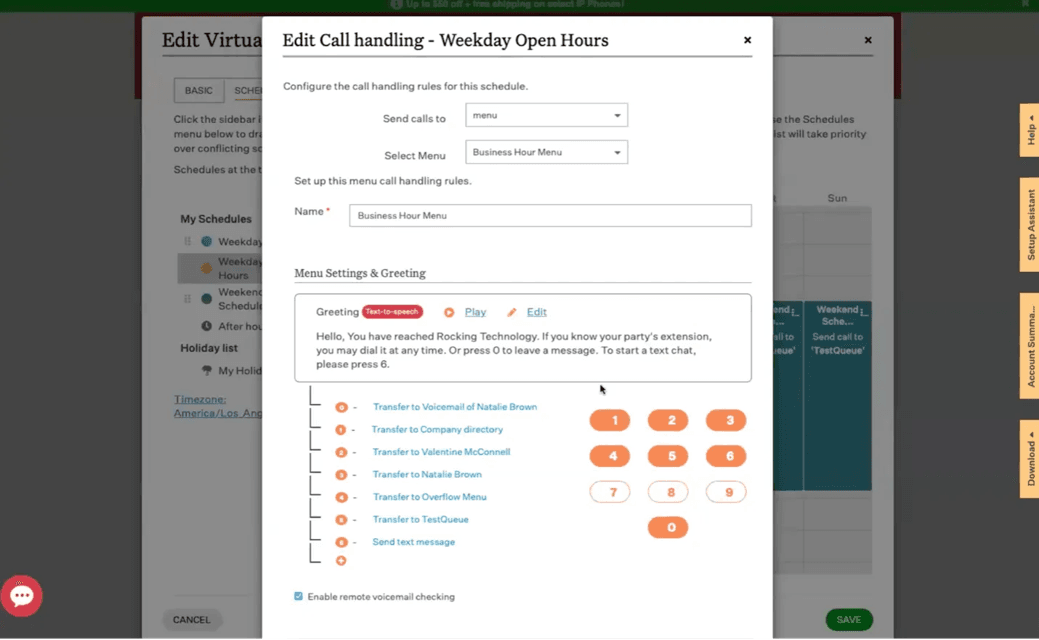
Ooma call handling

Setting up Ooma to suit our business was easy, requiring no training to get started. (Source: Ooma)

The higher tiers offer a useful growth path. Pro adds desktop calling, texting and video meetings, while Pro Plus adds call queues, customer relationship management (CRM) integrations and AI transcription and insights. Pro Plus can turn customer calls into records you can search later.

PlanMonthly RateSelected Inclusions
Essentials$19.95Calling, receptionist, mobile app and digital fax
Pro$24.95Desktop app, texting, recording and video meetings
Pro Plus$29.95AI transcription and insights, CRM connections, queues and team chat

Monthly service does not require a long-term contract. Ooma Enterprise is a separate, quote-based offering. AI answering and receptionist services are paid additions rather than unlimited features included in the Office subscription.

  • Essentials covers everyday office calling without an annual commitment.
  • Higher tiers combine app-based calling with texting and meetings.
  • Pro Plus now includes AI tools for reviewing customer conversations.
  • Desktop calling, texting and video require an upgrade from Essentials.
  • CRM integrations and call queues are reserved for Pro Plus.
  • AI answering services add to the subscription cost.

On TrustRadius, Ooma Office has a score of 6.4 out of 10 from 86 reviews and ratings. Reviewers value affordability and mobile access, although some describe problems with spam filtering, support or dropped calls. Read our Ooma Office review for additional detail.

Aircall logo
Editor's Rating: 9/10
Visit Site
Links to Aircall

Aircall is our recommendation for teams whose phones are central to sales or customer support. Its shared call inbox lets colleagues coordinate follow-ups, and CRM connections keep a customer’s records within reach. We like that the platform emphasizes the work around a call, including routing, recording and tracking unanswered inquiries.

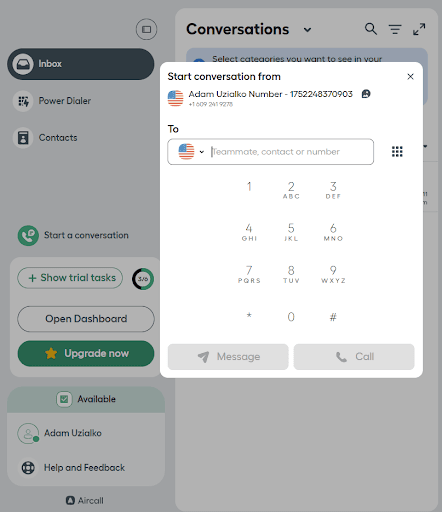
Aircall

Aircall’s user interface is intuitive and easy to navigate, even for first time users. Starting conversations with contacts is as easy as a few clicks or an address book search, and all the tools you’ll need are neatly organized and easy to find.

Professional adds tools for busier teams, such as queue callbacks, smarter routing, outbound dialing and conversation intelligence. Aircall also advertises an included allowance for its AI Voice Agents, with additional usage charged separately. These capabilities make it a stronger choice than a basic phone service when managers need to supervise customer interactions.

PlanMonthly RateSelected Inclusions
Essentials$30 (billed annually)Shared inbox, recording, transcripts, interactive voice response (IVR) and integrations
Professional$50 (billed annually)Call summaries, advanced routing, callbacks and Power Dialer
EnterpriseQuoteBroader global calling, single sign-on, onboarding and priority support

Prices are per license, per month. Essentials and Professional require three licenses, putting Essentials at $90 a month on an annual commitment. Enterprise requires 25 licenses. Ask for monthly-billing rates. Additional AI usage, premium AI assistance, extra numbers and messaging can raise the total.

  • Shared customer records help colleagues manage callbacks and handoffs.
  • Professional includes tools for outbound work and coaching.
  • Connections to popular CRM and help desk apps reduce duplicate call logging.
  • The minimum license purchase makes Aircall expensive for one- or two-person businesses.
  • Advanced AI assistance and additional AI agent usage cost extra.
  • Businesses seeking an all-in-one video meeting suite should compare Zoom or RingEX.

On TrustRadius, Aircall has a score of 8.0 out of 10 from 144 reviews and ratings. Users describe helpful CRM connections and convenient remote calling; some raise concerns about calling performance. Read our Aircall review for additional detail.

Zoom company logo
Editor's Rating: 8.8/10
Visit Site
Links to Zoom

Zoom Phone is a natural option for businesses that already use Zoom meetings and want employees to manage calling in the same environment. We like the choice between a phone subscription with basic meetings and Workplace bundles with longer sessions. It gives owners room to match each employee’s communication needs without treating a low-volume caller like a full-time meeting host.

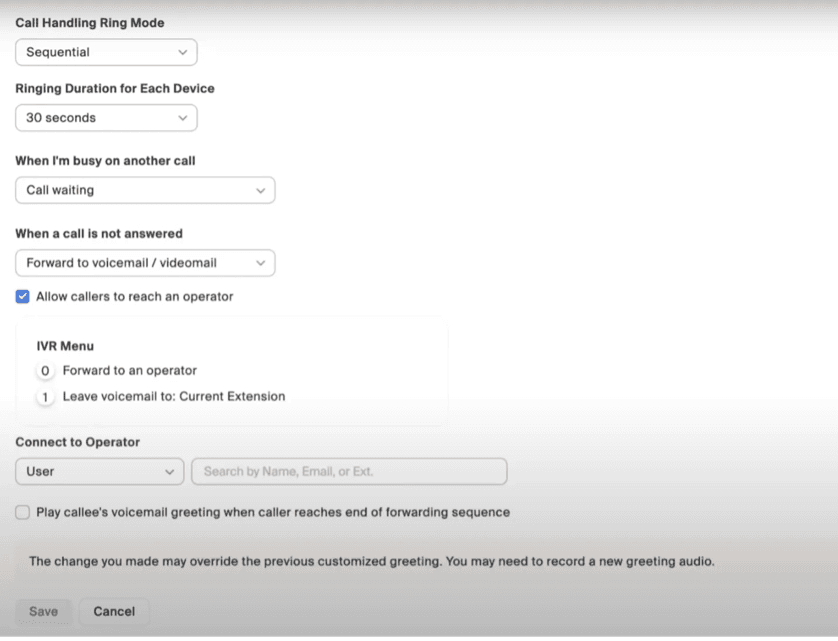
Zoom

The difference between phone service and the meeting license matters. A basic meeting lasts up to 40 minutes, while Pro Plus supports sessions up to 30 hours. Business Plus increases standard meeting capacity to 300. Phone AI features can summarize calls and help prioritize voicemail.

PlanMonthly RateSelected Inclusions
U.S. and Canada Metered$10.50 (billed annually)Usage-based calling with a domestic number
U.S. and Canada Unlimited$16 (billed annually)Unlimited regional calling with eligible SMS/MMS
Pro Plus$20.50 (billed annually)Phone service with Workplace Pro meetings
Business Plus$24.50 (billed annually)Workplace Business features and 300-person meetings

Prices are per user, per month, billed annually. Metered usage, international calls and some add-ons cost extra. Zoom Workplace Basic is free meeting software, not a free business phone subscription. Larger meetings require the applicable license or add-on.

  • Phone and meeting bundles simplify purchasing for teams already using Zoom.
  • Metered and unlimited plans accommodate different call volumes.
  • Paid Workplace bundles support longer meetings and additional collaboration tools.
  • The lowest phone price excludes metered calling charges.
  • The free meeting service limits session length and does not include free phone service.
  • Higher video capacity and specialized capabilities may require additional licensing.

On TrustRadius, Zoom Phone has a score of 7.5 out of 10 from 146 reviews and ratings. Reviewers value combined phone and meeting workflows but report concerns about settings, integration gaps and mobile performance. Read our Zoom Phone review for additional detail.

Vonage company logo
Editor's Rating: 8.7/10

Vonage is a useful choice when your team needs a phone service that can be tailored with additional capabilities. Mobile starts with calling and messaging through apps, while Premium adds desk-phone compatibility, meetings and the integration hub. We like that businesses can begin with a smaller package and evaluate the cost of specific additions as their requirements change.

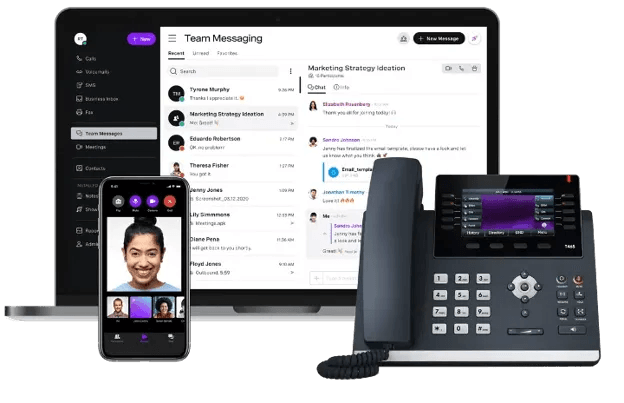
vonage

Advanced includes on-demand recording, call groups and visual voicemail with transcription. The distinction between included features and extras is particularly important here: a low advertised rate does not necessarily cover your preferred recording or customer service workflow. Compared with Ooma’s three fixed Office tiers, Vonage offers another route to customization, but owners should request an itemized quote before assuming it will be cheaper.

PlanMonthly RateSelected Inclusions
Mobile$13.99 promotional; $19.99 standardDesktop/mobile apps, calling, messaging and voicemail
Premium$20.99 promotional; $29.99 standardDesk-phone support, meetings, team messages and app integrations
Advanced$27.99 promotional; $39.99 standardOn-demand recording, visual voicemail and call groups

The illustrated per-line rates are for the smallest displayed line-count tier. Promotional pricing requires an eligible annual commitment; rates vary by line count. Vonage’s current offer terms run through Dec. 30, 2026. Taxes, fees, hardware and extras are additional; confirm your quoted rate and early termination obligations.

  • An app-based entry plan suits teams that do not need desk phones.
  • Higher tiers add office hardware and collaboration capabilities.
  • Paid extras let businesses price specific requirements.
  • Published promotions depend on eligibility, line count and contract terms.
  • The entry plan excludes features included in higher subscriptions.
  • Recording and other additions can make the final bill exceed the headline price.

On TrustRadius, Vonage has a score of 8.6 out of 10 from 103 reviews and ratings. Users highlight convenient mobile and desktop access, useful features and straightforward administration. Read our Vonage review for additional detail.

Verizon Business logo
Editor's Rating: 8.5/10

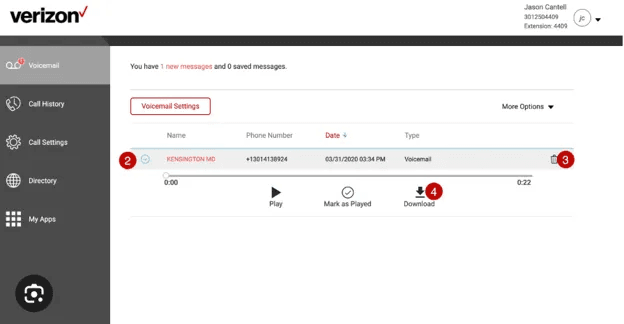
Verizon Business Digital Voice deserves consideration when an office is purchasing internet and phone service together. We like the convenience of evaluating connectivity and calling with one provider, especially for businesses that prefer desk phones and conventional call-handling tools. The service includes nationwide calling and features for moving calls between employees or devices.

Verizon

Its bundle price needs careful reading. The advertised $20 monthly rate is for each voice line alongside qualifying Fios service; it is not the cost of the complete internet-and-phone package. Stand-alone voice service is advertised at $35 per line, and the offer requires a two-year agreement. App-first businesses should compare that commitment with Ooma or Quo, and every buyer should check service availability at the specific business address.

PlanMonthly RateSelected Inclusions
Voice with qualifying Fios$20 per lineVoice service; qualifying internet purchased separately
Stand-alone voice$35 per lineBusiness Digital Voice without the Fios bundle discount

The advertised rates require a two-year contract. Hardware, internet, installation charges, taxes and fees can change the total. Ask Verizon for an address-specific quote and the applicable satisfaction guarantee.

  • A qualifying bundle brings internet and voice purchasing together.
  • Nationwide calling and established call-handling features suit office workflows.
  • Cloud call forwarding provides a way to redirect incoming calls when the office cannot answer.
  • The advertised voice price excludes the internet subscription.
  • The published offer requires a longer commitment than monthly app-based services.
  • Availability, equipment and package options depend on the business location.
Nextiva company logo
Editor's Rating: 9.5/10

Nextiva remains our pick for multisite retail and healthcare organizations because it offers a path from basic business calling to more coordinated customer service. Teams can use phone, messaging and digital engagement tools rather than managing each channel independently. We like the option to begin with Core and assess more advanced customer experience capabilities as call volumes and locations grow.

Nextiva

Plan selection is important for this use case. Engage expands customer interaction tools, while Scale adds capabilities such as skills-based routing and AI call summaries. Healthcare buyers should confirm the exact covered services and arrange a business associate agreement (BAA) before handling protected patient information.

PlanMonthly RateSelected Inclusions
Core$15 (billed annually); $23 (billed monthly)Voice, video, SMS, call routing and team chat
Engage$25 (billed annually); $50 (billed monthly)Customer-to-team texting, toll-free allowance, reporting and web chat
Scale$75 advertised; confirm billing termsFull CX tools, AI summaries and skills-based routing

Prices are per user, per month. Core and Engage annual rates require annual billing. Scale’s final billing terms should be included in your quote. CRM connections, AI receptionist services and some call center functions are additions; Nextiva’s enterprise contact center products are separate.

  • Calling and digital customer channels can support multiple teams.
  • Higher plans provide a path to more advanced routing and AI analysis.
  • Nextiva offers healthcare-specific arrangements and 24/7 support.
  • Advanced AI summaries and routing are not part of the lowest subscription.
  • CRM connections and other additions can increase the total cost.
  • Healthcare use requires confirming covered products, agreements and configuration.

On TrustRadius, Nextiva has a score of 8.5 out of 10 from 397 reviews and ratings. Users often praise support and call quality, while some describe difficulties with transfers, configuration or onboarding. Read our Nextiva review for additional detail.

dialpad company logo
Editor's Rating: 9.4/10

Dialpad Connect is our choice for businesses that want useful information from their calls without assigning someone to take notes. Its built-in AI provides real-time transcription and call insights alongside everyday calling and messaging. We like this approach for teams that need to revisit a conversation or identify a follow-up after the call ends.

dialpad

Owners should distinguish Connect from Dialpad’s other products. The company also sells dedicated support and sales platforms, with more specialized coaching, quality management and automation capabilities. Those capabilities may require a separate subscription. Compared with a full contact center purchase, Connect keeps the focus on business calling and collaboration.

PlanMonthly RateSelected Inclusions
Standard$15 annually; $27 monthlyBusiness calling, messages, meetings and built-in AI
Pro$25 annually; $35 monthlyAdditional integrations and administration features
EnterpriseQuoteEnterprise deployment and controls

Prices are per user, per month. Ask about seat requirements and the features included in your chosen tier. Dialpad Support, Sell and AI Agents are separate product purchases rather than features automatically covered by a Connect subscription.

  • Built-in transcription makes conversations easier to review.
  • Calling, messaging and meetings share a common app.
  • The entry annual rate is competitive for businesses seeking call AI.
  • The monthly Standard rate is considerably higher than its annual equivalent.
  • Specialized sales and support AI may require a different product.
  • Integrations and administration capabilities vary by tier.

On TrustRadius, Dialpad Connect has a score of 8.3 out of 10 from 577 reviews. Consult the current product-specific reviews when assessing call handling, usability and service reliability.

GoTo Connect company logo
Editor's Rating: 9.2/10

GoTo Connect is a strong option for employees who need to answer the same business lines from different locations. Calling, messaging and video meetings work through its apps, while centralized administration helps owners manage the system without visiting each site. We like the customizable dial plans for directing callers to the right team as schedules change.

The current lineup extends beyond the basic Phone System package. Customer Experience adds shared digital communication tools, and AI receptionist options can handle incoming inquiries when employees are unavailable. GoTo also advertises video meetings for up to 250 participants and calling to more than 50 countries, subject to regional terms. These tools make it comprehensive for distributed teams that need meetings, but quote-based pricing complicates a quick budget comparison.

PlanMonthly RateSelected Inclusions
Phone SystemQuoteCalling, dial plans, meetings and apps
Phone System with AI ReceptionistQuoteAdds AI answering, routing and caller intake
Customer ExperienceQuoteAdds shared digital channels and customer engagement tools
CX CompleteQuoteCombines customer experience tools and AI receptionist features
Contact CenterQuoteAdds agent routing, monitoring, coaching and callbacks

GoTo offers several phone, customer experience and contact center packages. Availability and inclusions can vary by region. Ask for license, usage and add-on costs; international calling and messaging are subject to the quoted service terms.

  • App access keeps remote colleagues connected to business lines.
  • Dial plans and centralized management support changing call workflows.
  • Meeting capabilities and international coverage broaden the service beyond domestic calling.
  • Public subscription prices are not available for direct comparison.
  • AI reception and advanced customer service functions depend on the package or add-on.
  • Messaging credits and international calling conditions vary by region.

On TrustRadius, GoTo Connect has a score of 8.0 out of 10 from 504 reviews and ratings. Users describe effective call routing and remote access, with some concerns about support and setup complexity. Read our GoTo Connect review for additional detail.

Quo logo
Editor's Rating: 8.7/10

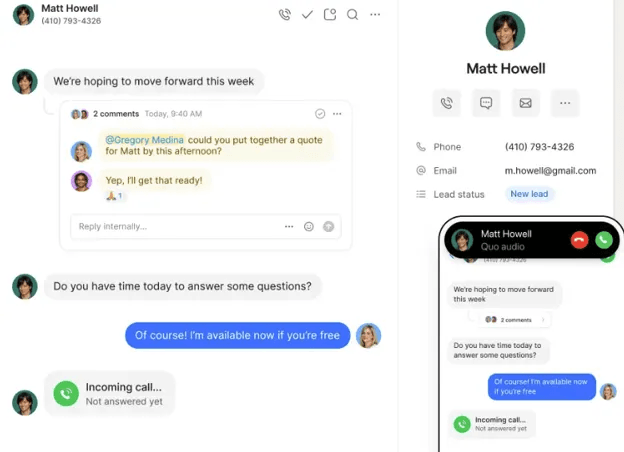
Quo, previously called OpenPhone, is our recommendation for small teams that share responsibility for customer conversations. Its shared numbers let colleagues see calls, texts and voicemails together, making it easier to cover a teammate’s absence or continue a customer inquiry. We particularly like the internal discussion tools: employees can coordinate a response without adding those messages to the customer’s conversation.

quo

8×8’s built-in AI tools can summarize meetings and highlight action items that need attention. Source: 8×8

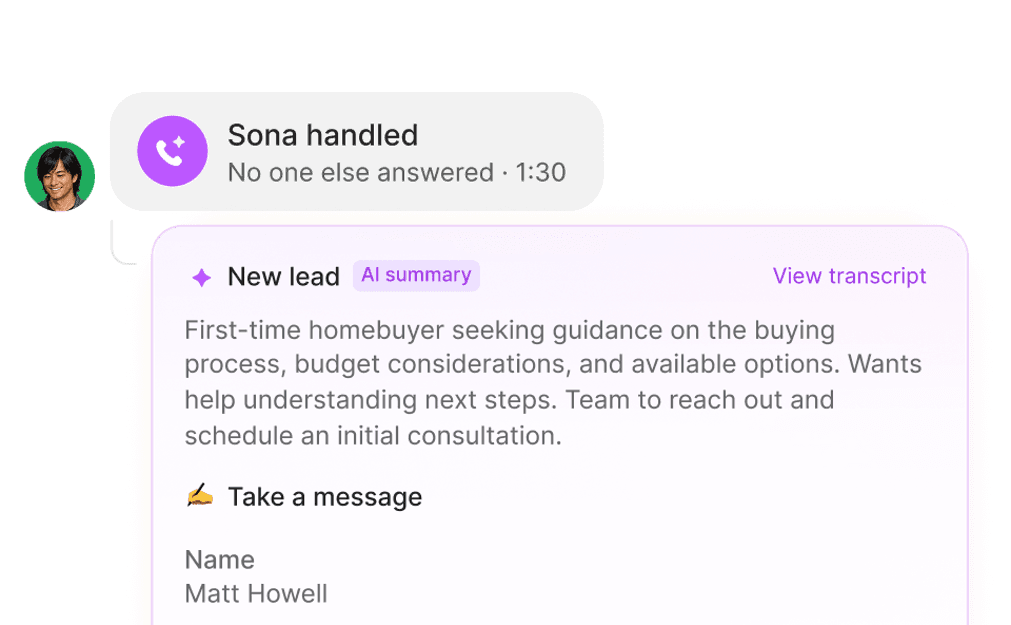
This approach suits a service business in which the owner and a few employees all answer the main number. Sona can field incoming calls, collect contact details and answer configured questions when staff are unavailable. Quo includes a small monthly automation allowance, but ongoing AI answering beyond that allowance costs extra. Business adds call summaries, transcripts and CRM connections; automatic AI call tags require Scale.

Quo concentrates on calling and texting rather than providing a full meeting suite. That keeps it relevant to teams that already have a separate video app, but businesses seeking one platform for voice and video should compare Zoom Phone or RingEX. The Starter plan also limits a shared number to 10 paid users, so expanding teams should account for a potential upgrade.

quo logs

Quo logs Sona-handled calls with a summary and caller details so employees can follow up. Source: Quo

PlanMonthly RateSelected Inclusions
Starter$15 annually; $19 monthlyNumber per user, calling/texting, shared numbers, voicemail transcripts and email support
Business$23 annually; $33 monthlyAI call summaries, transcripts, phone menus, automatic recording, CRM connections and chat support
Scale$35 annually; $47 monthlyAI call tags, onboarding, priority support and inbound phone assistance

Prices are per user, per month. Domestic calling and messaging are subject to fair use. Every plan includes 1,000 monthly automation credits, advertised as roughly 10 Sona-handled calls; extra use is billed separately. Additional numbers cost $5 a month. Messaging registration, carrier fees, international usage and automated outbound texts may add charges.

  • Shared conversation history helps small teams hand off customer work.
  • The base plan includes calling, texting and voicemail transcription.
  • Sona provides an option for answering inquiries when employees are unavailable.
  • Video meetings require a separate service.
  • Starter offers email support; chat and phone assistance require higher plans.
  • Additional AI usage and messaging-related charges can increase the bill.

On TrustRadius, Quo has a score of 8.2 out of 10 from 27 reviews and ratings. Reviewers highlight texting and usability; some report concerns about support, pricing or reliability. Some reviews refer to the former OpenPhone name.

RingCentral logo
Editor's Rating: 9.3/10

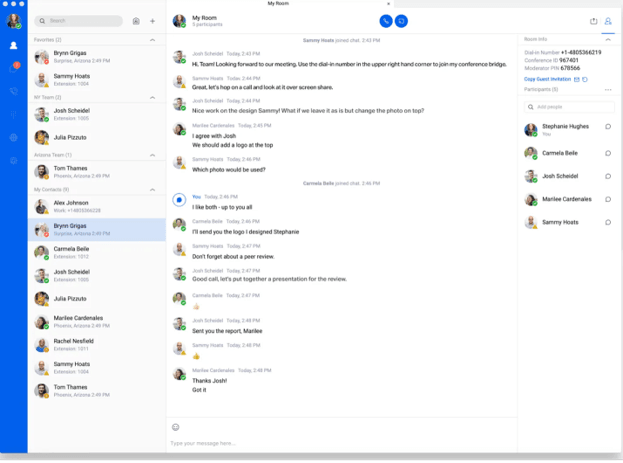
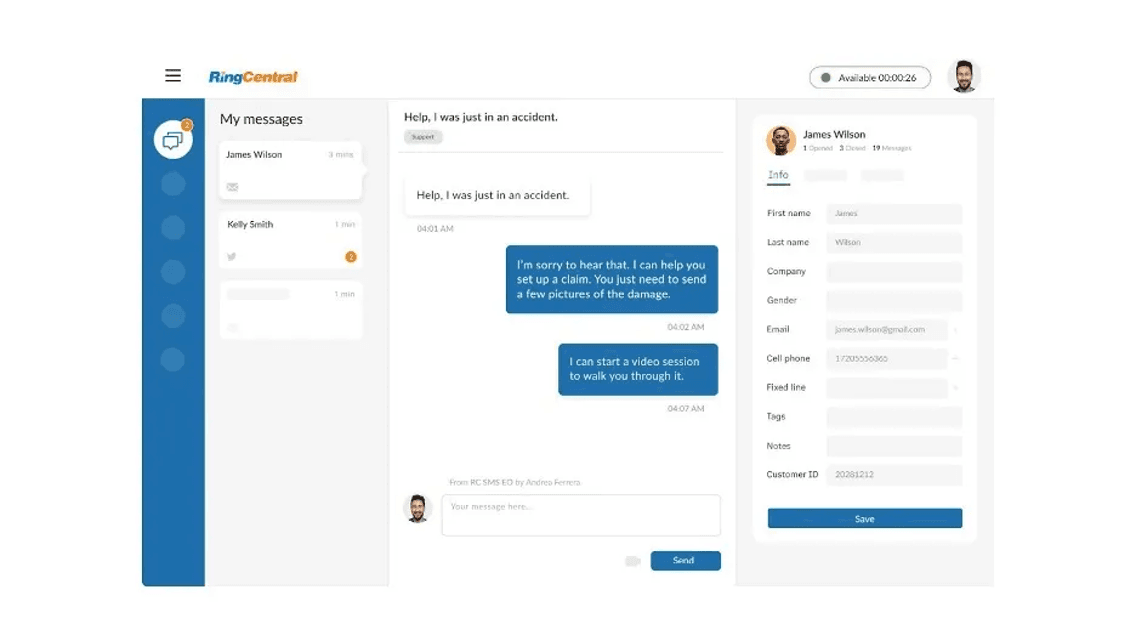
RingEX is our pick for collaboration because employees can keep calls, team discussions and video meetings in the same communications environment. Its apps make it practical to move between office and remote work, and its integrations connect communications with the business software teams already use. We like this broader approach for companies that need internal coordination as well as a customer phone line.

ringex messages

The AI Assistant adds transcription, summaries and writing support, with capabilities varying by tier. Advanced and Ultra also provide more substantial administration and analytics options for businesses managing several locations or departments. RingEX offers a wider collaboration suite than most other business phone systems we reviewed, although businesses should price their required integrations and AI features rather than assume the lowest tier includes everything.

PlanMonthly RateSelected Inclusions
Core$20 (billed annually)Business calling, messaging and video
Advanced$25 (billed annually)Additional integrations, fax and advanced management
Ultra$35 (billed annually)Expanded analytics and higher-tier capabilities

Prices are per user, per month, with annual billing. Confirm monthly rates and your required tier before purchasing. AI Receptionist, Conversational Intelligence and other boosters have separate prices. The 14-day trial supports up to 20 phone lines; SMS is excluded during the trial.

  • Calling, messaging and meetings support everyday teamwork in one service.
  • A large integration catalog connects communications with other business apps.
  • Higher tiers include controls for larger or more distributed organizations.
  • The base subscription does not include every integration or AI capability.
  • Additional AI services and boosters increase the total price.
  • The free trial does not let buyers test SMS.

On TrustRadius, RingEX has a score of 8.8 out of 10 from 544 reviews and ratings. Users praise core calling and messaging, while some describe inconsistent support, reporting limitations or mobile app issues. Read our RingEX review for additional detail.

What is a Business Phone System?

A business phone system is a communications platform that businesses of any size use to communicate with others outside and inside their company. Most of today’s business phone systems utilize either Voice-over-Internet-Protocol (VoIP), private branch exchange (PBX) or a combination of both.  While electronic communication, such as email, has become a prevalent form of communication, all businesses still need the tools to speak directly with clients, customers or other team members, and that’s what a business phone system provides. Unlike a home telephone, business phone systems provide companies with added functionality, such as unlimited calling, automated menus, ring groups to call multiple employees simultaneously and call recording. Many business phone systems have morphed into unified communications platforms that also include video conferencing, internal messaging and text messaging.

What Are the Advantages of Using a Business Phone System?

Cloud phone services can reduce the need to maintain a phone server at your office and give employees access to their business numbers through apps. They also offer call management tools that help smaller teams handle customers professionally. Their value depends on your needs, however: internet quality, subscription terms and the features included in your plan all affect the outcome.

Go beyond making calls

Cloud-based business phone systems do far more than make calls. They also support video conferencing, team messaging, SMS and online faxing. In addition, they offer integrations with popular business software and highly rated CRM platforms to properly manage customer data and communications across an entire business.
Enjoy communications flexibility.

Users can take and receive calls on any internet-connected devices, including computers, tablets, mobile phones and IP phones, with the same functionality as a traditional-looking desk phone. Businesses can send inbound calls to all devices at one time or set up ring groups that dial specific teams or employees with a simultaneous or sequential ring setting to ensure all inbound calls are routed and received correctly.

Get quality assurance

VoIP call quality depends on both the provider and your network. A strong internet connection and suitable configuration help limit delays, dropped audio and interruptions. Ask about the provider’s service-level agreement (SLA), how uptime is measured, exclusions and available credits. A provider’s uptime commitment does not guarantee uninterrupted service through your own internet connection.

What Are the Features of a Business Phone System to Keep in Mind?

Today’s business phone systems offer many valuable features for small businesses, such as auto-attendants, AI tools and video conferencing. Perhaps the greatest benefit of cloud-hosted systems is that they’ve opened the door for small businesses to access a multitude of advanced functions without overspending. Previously, only larger companies could afford feature-rich systems because of the capital required to install the necessary equipment. Below are some of the functions to look for in today’s modern business phone systems.

FeatureDescription
Unlimited callingMany of today’s cloud-hosted VoIP phone systems allow domestic calling to the U.S. and Canada for no additional charge. This gives you a fixed monthly service cost that doesn’t fluctuate based on how many calls your business makes and receives.
Automated attendantsAn auto-attendant answers calls to your business and routes them to the proper employees or departments.
Conference callingUC systems include a conference bridge that allows you to host your conference calls. The number of people who can be on a call at one time depends on the provider. Some systems support five to 10 people, while others allow hundreds of people at one time.
Video and web conferencingYou and your employees can host video meetings with video conferencing hardware or through a computer equipped with a camera and microphone. Most of these services allow for screen sharing, which lets everyone in the meeting view documents or presentations. The number of people who can be on a video call simultaneously varies by vendor and plan.
Instant messagingMany UC systems enable internal instant messaging. You and your team can send messages back and forth to ask questions and collaborate on projects.
Text messagingSince texting has become so popular, some phone systems allow you to text from your business line. This lets your staff send text messages to customers without revealing their personal numbers. [See our top choices for high-quality text message marketing services if you prefer a separate solution.]
Call recordingThis feature gives you the ability to record calls. The recordings are then stored in the cloud or on your computer for playback later.
Virtual faxingModern phone systems facilitate sending faxes through the internet rather than using a dedicated fax machine. You can send a fax to a recipient’s email or fax machine directly from the communications platform.
Ring groupsThis function allows you to group employees so that if a person calls needing someone in a particular group, such as your customer service team, all of the employees’ phones will ring. You can choose for phones to ring in a specific order or all at once.
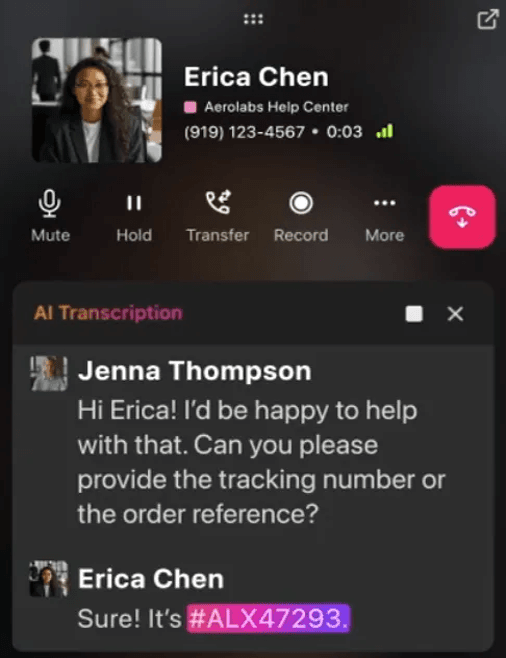
AI toolsDepending on the plan, AI can transcribe calls, produce summaries, suggest follow-up tasks or answer incoming inquiries. Confirm which functions are included, which require paid additions and whether usage is limited.
Software integrationsConnections to CRM, help desk and productivity apps can keep records aligned with calls. Check the exact integration, supported workflow and subscription tier; a listed app does not guarantee every feature is available.
TipTip
Before paying for AI answering, test the questions customers actually ask and confirm when the system hands a call to an employee. Review the caller information it captures and how your team will handle follow-ups.

What Are the Security Features of Business Phone Systems?

A phone platform may store recordings, transcripts and customer contact details, so account and data protections should be part of your buying decision. Ask how the provider encrypts traffic and stored information, controls account access and handles retention. Transport Layer Security (TLS) and Secure Real-time Transport Protocol (SRTP) can protect communications in transit, but their presence alone does not establish end-to-end encryption.

Evaluate these protections with the way your team actually works:

  • Multifactor authentication and single sign-on options that match your account setup.
  • Permissions that limit who can access recordings, transcripts and administration tools.
  • Retention and deletion controls, including the provider’s policies for AI processing.
  • Audit information, security documentation and a process for reporting incidents.
  • Network and device safeguards for employees working away from the office.

Healthcare organizations should confirm whether the specific services they will use support requirements under the Health Insurance Portability and Accountability Act (HIPAA). Where applicable, obtain a BAA covering those services and verify the required configuration. Vendor credentials do not replace your organization’s own obligations for protecting patient information.

How Much Will a Small Business Phone System Cost?

The providers on our list offer publicly priced entry plans around $10.50 to $30 per user or line, per month, before usage charges and optional services. More advanced customer experience subscriptions can cost substantially more, and some services require a custom quote. Annual commitments frequently bring a lower monthly equivalent, so compare the same billing period when weighing options.

Headcount and minimum purchases also matter. Aircall’s $30 annual-billing entry rate requires three licenses, which means the service starts at $90 a month before extras. Verizon’s $20 bundled voice line requires qualifying internet service purchased separately. Zoom’s lowest phone subscription uses metered calling, while Quo’s AI answering allowance does not cover unlimited automated calls.

Hidden costs and unexpected charges

While comparing business phone system prices, it’s crucial to understand the full cost picture beyond the advertised monthly rates. Many providers have additional fees that can significantly impact your total expenses.

Common hidden costs in business phone systems include:

  • Setup and Installation Fees: Professional VoIP setup usually costs extra, depending on complexity (though many providers waive this with annual contracts.) Traditional phone systems often require much higher installation costs due to physical wiring needs.
  • Hardware Costs: While basic VoIP services usually include a softphone app, dedicated IP phones will cost you above and beyond a softphone, usually starting around $50 per device and reaching several hundred dollars. Traditional desk phones and PBX hardware can cost thousands for small businesses.
  • Regulatory and Tax Fees: Government-mandated charges are often unavoidable. E911 fees typically range from $0.20 to $2.00 per line, and various state and local taxes apply.
  • International Calling Charges: International calling costs generally span from one to three cents per minute for popular destinations, while remote locations may incur charges exceeding $2 per minute.
  • Number Porting Fees: Transferring your existing phone numbers to a new provider typically costs $10 to $30 per number, though some providers include this service free.
  • Contract and Cancellation Penalties: Some providers charge cancellation fees if you end service early, and auto-renewal clauses can lock you into unwanted contract extensions.

To avoid surprises, always request a detailed cost breakdown from providers and ask specifically about:

  • All one-time setup costs.
  • Monthly regulatory fees and taxes.
  • Costs for essential features you’ll need.
  • International calling rates, if applicable.
  • Contract terms and cancellation policies.

FYI: Ask for a quote that includes recurring subscriptions, equipment, setup, messaging registration, usage charges and cancellation terms. Porting an existing number and getting approval for business texting are separate processes, so include both in your migration plan.

What to Consider When Choosing a Business Phone System

No matter your unique circumstances, there are a few factors that are always important to keep in mind when shopping for a business phone system. We asked business owners and decision makers who recently went through the buying process to explain how they went about finding the best business phone system for their needs and what they prioritized during their search.

Cost

When it comes to cost, don’t just choose the cheapest platform, even if you’re on a tight budget. Consider which solution offers the most value per dollar instead, including features you need at no additional cost. Sometimes the cheapest systems lack features that usually come standard and vendors charge additional fees for access to them.

“While some providers may provide cheap monthly rates, more money may be charged for additional features. I originally chose a VoIP service with a cheap basic rate, but I soon found out that there were extra costs for things like call recording,” Victor Zeng, global business director of XMAKE, told us. “Selecting a package that strikes a balance between price and vital features is crucial.”

Usability

Test the phone systems you’re considering whenever possible to determine how easy they are to use. Avoid platforms that require extensive training, as they’re likely to frustrate your employees and disrupt productivity. The best business phone solutions are relatively intuitive and won’t take long for the average user to navigate successfully.

Reliability

Review the provider’s SLA and ask what happens if the service becomes unavailable. A 99.999 percent annual uptime commitment corresponds to roughly five minutes of downtime over a 365-day year, but coverage, exclusions and remedies differ by vendor. Test calls on the networks employees will use and decide how your business will redirect calls during an internet or power outage.

Mobile capabilities

Today, it’s common for workforces to be distributed, whether your team includes remote and hybrid workers or you manage a fleet of drivers. While desk phones and conference calling systems may be important in an office, softphones and mobile apps are key for employees who aren’t always on site.

“In our field of work, we’re always moving around from state to state, talking with drivers, customers and logistics partners. We needed a phone to communicate smoothly, whether at the office or on the go,” said Zach Asher, owner of Amerigo Auto Transport. “A key selling point for Dialpad was its solid mobile app. It can also switch calls from desktop to mobile without dropping them.”

Integrations

The best business phone systems tie into your existing tech stack. Consider the business software you already use and which apps must integrate with your business phone system. Generally, this will include tools like your CRM and contact center software.

“When choosing a system, we prioritized scalability and integration capabilities,” said Kevin Shahnazar, founder and CEO of FinlyWealth. “As a fast-growing startup, we needed a solution that could grow with us and seamlessly integrate with our existing CRM [software] and productivity tools.”

What is Involved with Setting Up and Migrating a Phone System?

Start with the devices, internet connections and call flows your employees will use. Ask the provider for its network requirements, then test real calls from the office and common remote work locations. Create users, assign numbers and configure reception menus, voicemail and after-hours handling before moving your main business number.

A new app-based number can be available before a transferred number is ready. Porting depends on the losing carrier, the type of number and accurate account information; messaging registration may follow a separate approval process. Keep your existing service active until the transfer succeeds and confirm the cutover date with the new provider.

Before switching, ask which party manages number transfers, what equipment must be replaced and how support handles a problem during cutover. Train a small group first if the system changes how employees answer calls or manage customer messages. Test outgoing caller ID, transfers, voicemail, routing and any essential integrations before expanding the rollout.

For terminology and number options, see our guide to VoIP phone numbers. If you need dedicated marketing campaigns, compare the best text message marketing services.

Methodology

At Business News Daily, our team of small business unified communications experts has been researching and testing business phone systems for years, comparing some of the leading solutions across more than 25 key metrics.
We considered 75 business phone systems in our initial pool of candidates. To determine which to test further, we looked at pricing plans, hardware options, core features, reported system uptime and the availability of customer support. We also considered the setup process for each business phone system and prioritized the ones that were straightforward and quick to get up and running. Finally, we considered customer reviews to determine which vendors seemed to deliver on their promises according to real-world customers.

After narrowing our list down, we closely reviewed and tested 20 of the solutions before selecting our 10 best picks above. This testing started with scheduling live demonstrations to get an overview of each business phone system and asking questions of company representatives to learn more about the system itself and the service the vendors provide. We also accessed free trial software to get a firsthand sense of how each phone system worked, and we looked for tutorial videos and guides to see whether new users could get up to speed quickly with nothing more than self-guided materials.

Below are the factors we considered when determining our best picks. Each is weighted according to how much the criteria typically influence business owners’ buying decisions.

  • Pricing (30%): We considered not just the platform’s base cost but also the number of pricing plans, costs for each user and add-on fees for additional services to determine which provides the most value per dollar.
  • System Features (25%): We particularly evaluated the key tools most businesses seek in phone systems, such as automated attendants, call recording, call parking, call forwarding and call blocking. We also considered whether the platform offered additional communications services, such as online faxing, video conferencing, internal instant messages and text messaging.
  • Usability (20%): We paid close attention to how simple it was to set up the phone solution, how intuitive we found the navigation and use of key features, and the training and informational resources available to new users. We also considered whether the vendor offered a desktop and mobile app that ensured users could take calls from anywhere.
  • Customer Support (15%): We examined the ease with which customers can contact the team for help, and we reviewed customer feedback to determine how well the customer service team meets the needs of existing customers.
  • Equipment Options (10%): We considered the amount of hardware included with each business phone system’s base subscription cost. Some providers include free desk phones, such as those from top providers like Cisco, Poly and Yealink, or conference systems, while others only provide access to software and charge extra for phones. Those that included hardware received extra consideration when selecting our best picks.

In addition to scoring each business phone system we reviewed based on these criteria, we also determined the best use case scenarios for each. No two businesses are exactly alike, so we put ourselves in the shoes of different types of small business owners to identify the best communication systems for a variety of needs.

To learn more about how we review and test communications products and services for small businesses, read about our editorial process.

What's the Difference Between a Business Phone Service and a Business Phone System?

When choosing a business phone system, one of the most important decisions is whether to go with a VoIP system or stick with traditional landline phones. Understanding the key differences can help you make the best choice for your business needs. VoIP systems transmit calls over the internet, while conventional phone systems rely on copper wires and physical infrastructure. These setups bring a variety of advantages and disadvantages.

Advantages of VoIP systems include:

  • Cost savings: VoIP eliminates the need for expensive physical infrastructure and reduces long-distance charges.
  • Scalability: Adding new lines is as simple as a few clicks, without requiring physical installation.
  • Mobility: Employees can make and receive calls from anywhere with an internet connection.
  • Advanced features: Video conferencing, voicemail-to-email, call recording and mobile apps come standard,
  • Integration capabilities: Easily connect with CRM systems and other business applications.

Advantages of traditional phone systems include:

  • Widespread availability: Copper wire networks reach areas with poor internet coverage.
  • Familiarity: Many businesses are comfortable with traditional systems and existing equipment.
  • Independence from internet quality: Call quality isn’t affected by bandwidth limitations.

However, traditional systems have significant drawbacks:

  • Higher costs: Expensive hardware, installation and ongoing maintenance fees hurt businesses financially.
  • Limited functionality: Landlines only support basic voice calls, not modern communication features.
  • Scalability challenges: Adding lines requires physical installation and equipment.
  • Location dependence: Phones are tied to specific physical locations.

A report from Research and Markets shows that the VoIP market is expected to exceed $280 billion by 2030. This indicates strong business adoption of internet-based phone systems over traditional phone services.

FAQs

All businesses can benefit from a good phone system, although not all businesses will benefit from the same type of business phone system. Communicating with your colleagues, customers and clients in a professional manner is critical. That’s why relying solely on personal mobile devices can cause problems. You want to make a great impression on your customers. A greeting from an automated attendant via a modern business phone system is a great first step. It shows your company is a legitimate operation.

Businesses that don’t require a traditional office phone system should consider investing in a virtual one. These allow you to present a professional image while still using your mobile device as your main communication tool. Virtual systems include automated attendants and a host of other valuable features. In addition, when you make outbound calls, your business number — not your personal mobile number — is displayed to the person you’re calling.

For larger businesses, business phone systems not only help you present a professional image to your customers but also give your employees all the communication tools they need to do their jobs well and keep in touch with co-workers. Mobile apps allow team members to take their business lines with them wherever they go, and video conferencing services ensure they can connect with anyone, regardless of where they are or how they want to communicate.

UC, or unified communications, is the ability to access all your communication tools from one platform. Many of today’s business phone systems are UC systems. While these solutions still offer traditional phone service, they include other communication tools that professionals now commonly rely on.

These additional tools include audio, video and web conferencing; instant messaging; and text messaging. Previously, to have all of these communication tools, organizations had to use a different vendor and system for each service. UC streamlines the process by allowing you to access all of these features from the same provider via an all-in-one platform. This not only boosts employee productivity but can also be a significant cost-saver for businesses.

The setup process for a small business phone system depends on the kind of solution you choose, but a huge benefit of today’s platforms is how easy they are to implement. The basic implementation process follows these steps:

  1. Choose a VoIP provider that offers the features and pricing suitable for your business size and needs.
  2. Purchase or configure the necessary equipment, such as IP phones, headsets or use softphone apps on existing devices.
  3. Set up your internet connection to ensure adequate bandwidth for voice calls and configure your router for optimal call quality.
  4. Create your phone system structure by assigning phone numbers, setting up extensions, configuring voicemail and establishing call routing rules.
  5. Test all functionality thoroughly, train your team on the new system and then port your existing business numbers to complete the transition.

VoIP solutions are completely managed from an online portal. Administrators can log into the portal to assign business phone numbers and extensions, add new users, delete users and turn features on or off for individual users. You can access this portal from anywhere with an internet connection. Naturally, on-premises implementations are more involved.

Employees tend to benefit most from VoIP office systems. These systems provide workers with valuable tools to address all of their communication and collaboration needs. Voicemail-to-email, call recording, instant messaging and call forwarding are some of the features employees can typically access with a VoIP system.

Additionally, VoIP solutions allow lots of mobility. Many vendors offer their own mobile apps that give workers the freedom to answer and make calls to and from their business lines via their mobile devices. This helps ensure they never miss an important call.

Small business owners also benefit greatly from VoIP office systems. These platforms give small businesses access to features and tools previously affordable only by larger organizations. Installing these systems for a relatively low price is a huge advantage for smaller companies.

Yes. An app-based business phone service lets you make and receive calls using a business number on your cell phone. Quo is one option for small teams that also want shared call and text history; Ooma Office, Zoom Phone and other providers offer mobile apps as well. Test your connection, notification settings and call routing before relying on the app as your main business phone.

Did you find this content helpful?
Verified CheckThank you for your feedback!
author image
Written by: Jeff Hale, Senior Analyst
Jeff Hale is a communications and content marketing expert with extensive experience leading teams as a managing editor. He has deep knowledge of B2B communications technologies, including business phone systems and customer relationship management (CRM) software. Jeff is also an entrepreneur who knows the realities of launching and managing a small business, where he serves as a Content Director and SEO Consultant. At Business News Daily, Jeff primarily covers business technology, including VoIP phone systems, remote PC access software and CRMs. Jeff is also an entrepreneur who knows the realities of launching and managing a small business, where he serves as a Content Director and SEO Consultant. In his role as an entrepreneur and professional, Jeff has identified new market opportunities for Fortune 500 clients and developed communications strategies and digital branding for tech startups and small businesses. Jeff holds a Bachelor’s degree in English from the University of California, Irvine, and an MBA from Chapman University.
Close
Find the Right IT And Technology Security Today
Compare quotes and see how the right IT and technology security can help your business.
Advertising Disclosure
Close
Advertising Disclosure

Business News Daily provides resources, advice and product reviews to drive business growth. Our mission is to equip business owners with the knowledge and confidence to make informed decisions. As part of that, we recommend products and services for their success.

We collaborate with business-to-business vendors, connecting them with potential buyers. In some cases, we earn commissions when sales are made through our referrals. These financial relationships support our content but do not dictate our recommendations. Our editorial team independently evaluates products based on thousands of hours of research. We are committed to providing trustworthy advice for businesses. Learn more about our full process and see who our partners are here.

Info