


Get free guidance and exclusive deals to grow your business with business.com+
Join Free
BND Hamburger Icon

Menu

Close
BND Logo
Search Icon
Search Icon
Advertising Disclosure
Close
Advertising Disclosure

Business News Daily provides resources, advice and product reviews to drive business growth. Our mission is to equip business owners with the knowledge and confidence to make informed decisions. As part of that, we recommend products and services for their success.

We collaborate with business-to-business vendors, connecting them with potential buyers. In some cases, we earn commissions when sales are made through our referrals. These financial relationships support our content but do not dictate our recommendations. Our editorial team independently evaluates products based on thousands of hours of research. We are committed to providing trustworthy advice for businesses. Learn more about our full process and see who our partners are here.

Best Job Posting Sites for Employers in 2026

A job posting site’s sticker price is not the only factor to consider. We compared how five hiring platforms bill you, and where each one sends the risk.

author image
Written by:
Adam Uzialko, Senior Editor
author image
Editor verified:
Chad Brooks,Managing Editor
Last Updated Sep 10, 2026
Business News Daily earns commissions from some listed providers. Editorial Guidelines.
ZipRecruiter logo
ZipRecruiter
9.3 /10
Editor's rating
Best for Wide Distribution
  • Starting price: Quote required
  • Candidate pool: 56M+ resumes
  • Top feature: 100+ site posting
Indeed logo
Indeed
8.8 /10
Editor's rating
Best for Hiring on a Budget
  • Starting price: Free (3 posts/mo)
  • Candidate pool: Indeed, Glassdoor
  • Top feature: Free job postings
LinkedIn logo
LinkedIn Jobs
8.5 /10
Editor's rating
Best for Salaried and Specialized Roles
  • Starting price: Free for one job
  • Candidate pool: Professionals
  • Top feature: Passive candidates
Workable logo
Workable
8.4 /10
Editor's rating
Best for Tracking Applicants
  • Starting price: $299 per month
  • Candidate pool: 400M+ profiles
  • Top feature: Applicant tracking
Handshake logo
Handshake
8.2 /10
Editor's rating
Best for Interns and New Graduates
  • Starting price: Free to post
  • Candidate pool: 25M+ verified
  • Top feature: School targeting
Table Of Contents Icon

Table of Contents

Open row

Ask an owner what a job posting costs and you will usually get a number. Ask what triggered the charge and the answer gets vague. That gap is where hiring budgets quietly disappear. Two of the five platforms we recommend below can bill you for a candidate who clicks your listing, reads two lines and closes the tab, and neither one is doing anything underhanded when it happens. It is simply how their meter runs.

So we approached this category from the invoice backward. For each platform we pulled the current pricing page, the plan comparison grid and the employer help documentation, then worked out three things: what you are buying, what event actually triggers a charge, and who absorbs the loss when a posting draws traffic but no hire. We also checked whether each company still exists in the form employers remember, which turned out to matter more this year than it usually does. What follows is five recommendations, a plain accounting of how each one takes your money, and the questions worth asking before you enter a card number.

At Business News Daily, we’ve spent years researching and testing the HR software and services that entrepreneurs need to manage their teams effectively. Our team of small business HR specialists conducts independent evaluations of the best HR service providers to determine which best support internal operations. We also regularly consult with HR experts, including recruiters, hiring managers, compliance officers and HR consultants, to stay on top of the latest HR trends impacting small businesses. And every review we publish is evaluated by our editorial staff to ensure objectivity, accuracy and fairness are at the core of our decision-making. Learn more about our editorial guidelines.

How we decided

We built an initial list of 18 platforms that small and midsize employers routinely shortlist, spanning general job boards, professional networks, campus recruiting networks and applicant tracking systems with built-in distribution. 10 made it to a detailed evaluation. Five became our best picks.

Corporate status knocked out two familiar names before we assessed a single feature, which is unusual...

Read MoreRead More

We built an initial list of 18 platforms that small and midsize employers routinely shortlist, spanning general job boards, professional networks, campus recruiting networks and applicant tracking systems with built-in distribution. 10 made it to a detailed evaluation. Five became our best picks.

Corporate status knocked out two familiar names before we assessed a single feature, which is unusual and worth explaining. One had been legally absorbed into another platform already on our list, making it a duplicate rather than a choice. The other had changed hands through a bankruptcy sale. Neither exclusion reflects a broken product, but those circumstances precluded us from selecting either as a best pick.

For the remaining platforms, we gave the most weight to two things: whether the candidate pool contains people who do the work you are hiring for, and whether you can find out what the platform costs before you commit.

18

considered

10

reviewed

5

selected

We built an initial list of 18 platforms that small and midsize employers routinely shortlist, spanning general job boards, professional networks, campus recruiting networks and applicant tracking systems with built-in distribution. 10 made it to a detailed evaluation. Five became our best picks.

Corporate status knocked out two familiar names before we assessed a single feature, which is unusual and worth explaining. One had been legally absorbed into another platform already on our list, making it a duplicate rather than a choice. The other had changed hands through a bankruptcy sale. Neither exclusion reflects a broken product, but those circumstances precluded us from selecting either as a best pick.

For the remaining platforms, we gave the most weight to two things: whether the candidate pool contains people who do the work you are hiring for, and whether you can find out what the platform costs before you commit.

18

considered

10

reviewed

5

selected

Compare Our Best Picks

BND Ribbon
Our Top Picks for 2026
ZipRecruiter
Indeed
LinkedIn Jobs
Workable
Handshake
Rating9.3/108.8/108.5/108.4/108.2/10
Use case

Wide distribution

Budget

Salaried roles

Tracking applicants

Interns and grads

Starting price

Quote required

Free, three jobs per month

Free, one job at a time

$3,588/year

Free

Billing method

Flat rate per job slot or per day

Free, or per click or application

Free, or per qualified click

Flat rate by employee count

Free, or quoted campaign tiers

Free posting

Trial only

Three per month

One at a time

Trial only

Standard postings

Candidate pool

56M+ resumes

Indeed plus Glassdoor

Professional network

400M+ profiles

25M+ verified

Applicant tracking

Basic dashboard

Basic dashboard

Basic dashboard

Full ATS

Basic dashboard

Scroll Table

Our Reviews

ZipRecruiter logo
Editor's Rating: 9.3/10

ZipRecruiter’s central premise is that your listing should not have to be found. When you publish a role, the platform pushes it to more than 100 job sites in a single action, Google Jobs and industry boards among them, and its matching technology reads through resumes and sends invitations to people whose experience lines up. Applications arrive because the system went and asked for them. That’s a major benefit for an entrepreneur who doesn’t have a recruiter or hiring staff to work the process for them.

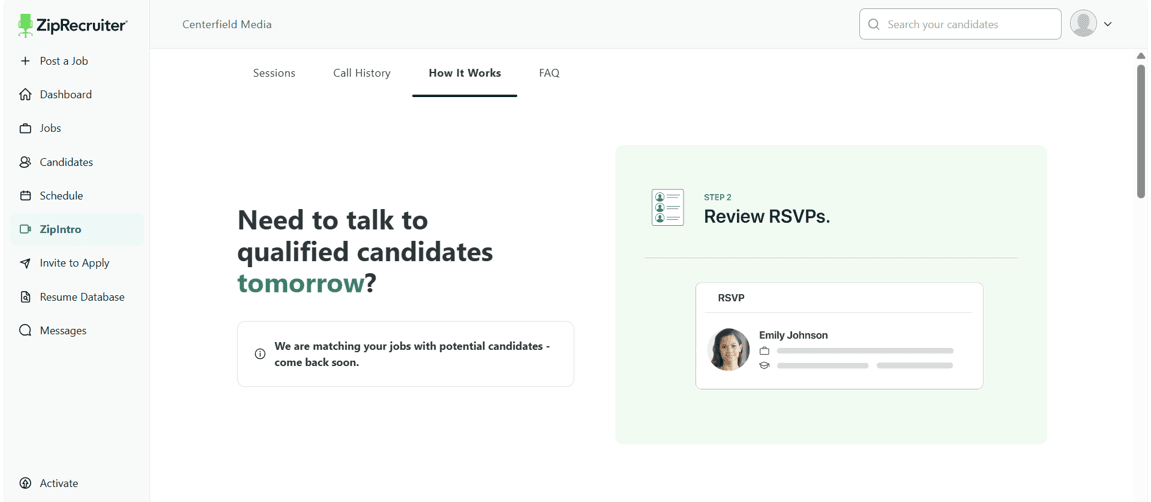
ZipRecruiter Zipintro

ZipIntro offers a way to meet qualified candidates directly within the platform, which we found useful for busy entrepreneurs without a dedicated hiring team. In our test of the platform, ZipRecruiter was still matching potential candidates with our job posting, so we weren’t able to schedule a session—but we preferred that ZipRecruiter take the time to identify meaningful matches instead of just quantity.

The platform reaches a substantial audience, too. ZipRecruiter reports that nearly 20 million job seekers use the platform each month and that more than 4.9 million businesses have used the platform. Openings also travel outbound through daily email and text alerts, and the platform supplies more than 500 job description templates and screening questions you can attach to filter what comes back.

Two details particularly impressed us. The first is the job slot. When you fill an open role early, the job slot doesn’t close with it; you can use that slot to hire for another open role, making use of all 30 days you paid for. For a company that hires unpredictably, that flexibility is worth more than a cheaper headline rate.

The second is that ZipRecruiter doesn’t charge for interactions like some of the other platforms we reviewed. Clicks and applications are unlimited inside the standard rate, with no per-click or per-application surcharge, so a listing that catches fire costs the same as one nobody looks at.

ZipRecruiter keeps its rates off its website. The company says pricing is built around your hiring needs and mentions monthly subscriptions with adjustable job slots alongside pay-per-day options, but the plans page shows no figures. What you pay depends on how many job postings you keep active, whether you need resume search and how many people need logins.

ZipRecruiter offers the following three tiers, each with distinct features:

PlanWhat it addsHow to get a price
StandardHiring dashboard, one-click posting to 100-plus boards, AI outreach to matching candidatesStart a free trial
PremiumStandard plus resume database searchStart a free trial
ProPremium plus TrafficBoost for stubborn roles and applicant tracking system integrationsContact sales

You can start Standard or Premium yourself without speaking to anyone. Pro means a sales conversation, as does enterprise service, which ZipRecruiter reserves for companies above 5,000 employees. Ask for the quote in writing, confirm what the rate becomes when the trial ends, and ignore the dollar figures floating around third-party sites. In our research, we found those often disagreed with each other by hundreds of dollars a month on tiers with the same name.

  • Your rate does not move when a posting performs well, because clicks and applications are unlimited and included.
  • One publish action reaches more than 100 job sites, the widest automatic distribution among our picks.
  • Job slots are reusable, so filling a role early frees the slot for the next opening immediately.
  • You cannot price-shop without starting a trial or booking a call, since no rates are published.
  • Resume search requires the Premium tier, leaving the entry plan dependent on inbound applications.
  • Reviewers frequently report that the applicant volume arrives with relevance problems attached, which moves the cost into screening hours.

ZipRecruiter carries a score of 8.4 out of 10 on TrustRadius from 237 reviews, and 4.4 out of 5 on Trustpilot from more than 12,800 reviews.

Employers reliably credit the platform with delivering applicants quickly and casting a wide net, and many report a jump in application volume after switching.

The complaints revolve around candidate suitability for the open role, filters that are not precise enough to narrow a large pool and enough unqualified applications to require real screening time.

Indeed logo
Editor's Rating: 8.8/10

If your hiring budget this quarter is zero, Indeed is where you start. An employer account takes a few minutes to create, and a posting with a title, location, pay and description goes live at no cost. For a business hiring its first employee, Indeed removes the question of whether to spend anything at all.

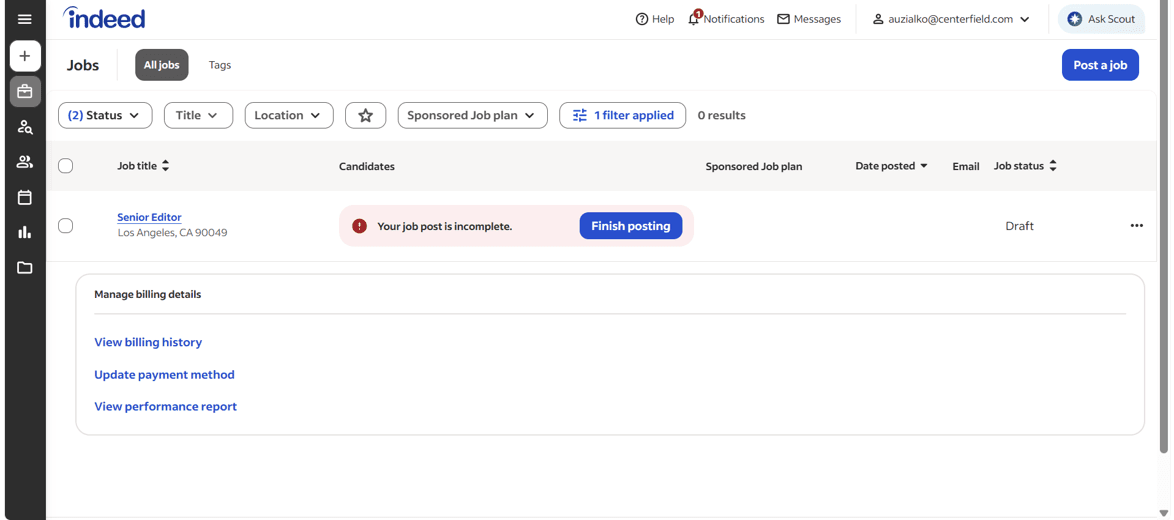
Indeed dashboard

Indeed’s job dashboard displays all your created jobs and flags those that still need more attention. In our test, we didn’t actually publish our test job posting—we felt that’d be unfair to candidates who were seeking real open positions—but we appreciated that Indeed called our attention to the fact our posting was incomplete.

The free tier buys you presence, but free postings are unlikely to outperform paid postings. When you do sponsor, Indeed proposes a budget based on your title, location and description, which you are free to disregard, and you can pause or shut off a sponsored job from the dashboard whenever the results stop justifying the spend.

Worth noting is that Glassdoor fully merged into Indeed in July 2026, completing an integration between the two Recruit Holdings properties that had been underway for more than a year. Glassdoor’s brand, its product and its anonymous employer reviews all continue to exist, but the site now operates under Indeed’s terms of use and privacy policy, and the separate Glassdoor posting flow for employers is gone. Instead, one Indeed listing now serves both audiences. That is why Glassdoor does not appear as its own entry on this page, and why we would look carefully at any current roundup that treats them as two separate buys.

Indeed is free for up to three job postings per month, but it costs money to sponsor a post to drive additional visibility. Indeed requires payment details before it starts promoting anything.

Per Indeed’s own pricing documentation, charges accrue when a job seeker interacts with your post, and what counts as an interaction depends on the budget type you pick. On a daily budget you are generally charged when someone clicks through to view the job. On a monthly budget the charge may instead land when someone begins an application. Your total spend follows the budget you set and how the listing performs.

Many U.S. accounts bill on the first of the month or once cumulative sponsored spend crosses a standard threshold, usually $500, whichever arrives first. A campaign that spends quickly therefore generates an invoice sooner than the calendar suggests. Indeed takes credit cards, and offers insertion orders, ACH or wire transfer and checks.

  • The free tier is a permanent product rather than a trial, making Indeed the lowest-stakes place to begin.
  • A single listing now reaches both the Indeed and Glassdoor audiences after the July 2026 merger.
  • Sponsored budgets are yours to set, pause or cancel from the dashboard at any point.
  • Organic listings are outranked by sponsored ones, so free visibility fades fast on competitive roles.
  • Because charges follow candidate clicks and application starts, a busy listing can exhaust its budget without producing a hire.
  • Employers describe heavy irrelevant volume and thin sorting tools, including the absence of boolean search across applicants.

Indeed.com holds a score of 8 out of 10 on TrustRadius from 166 reviews.

Recruiters and staffing agencies who use Indeed as a sourcing tool rate the posting and search workflow well and repeatedly note that it is the only platform in their stack they pay nothing for.

The dissatisfaction concentrates on too many irrelevant resumes, an applicant dashboard that omits basics like current job title or years of experience, no way to run a boolean search across applicants, and slow removal of fake or duplicated profiles.

LinkedIn logo
Editor's Rating: 8.5/10

The person you most want for a specialized role is usually already employed and unlikely to visit a job board this week. LinkedIn is the only platform on this page designed to reach an audience of employed professionals who aren’t actively looking for a job. The social media network’s audience is there for many reasons beyond just looking for work (though, of course, some users are #OpenToWork as well). For controller, engineer, analyst and manager searches, that changes who ends up in your pipeline.

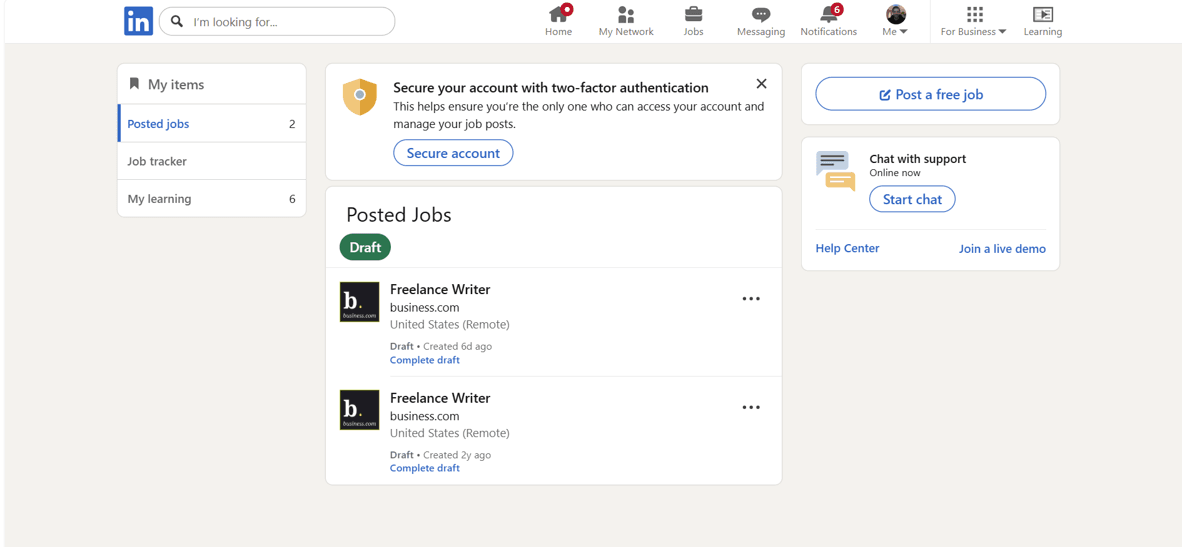
LinkedIn jobs

LinkedIn Jobs is easy and convenient to use if you already have a LinkedIn profile. Here you can see my draft job postings looking for freelance writers. The more recent one was just a test for this review, but you can see I was actually searching for freelance writers two years ago, too. If you ever wanted to write these kinds of reviews, here’s your sign. Just saying.

LinkedIn provides free posting for individual roles and targets members whose profiles fit the criteria in your post. Teams hiring on a rolling basis move up to LinkedIn Recruiter and job slots, which add sourcing, detailed search filters and promoted placement to selected member audiences.

LinkedIn performs best for professional and technical positions and underperforms for hourly, warehouse and production work, mostly because those candidates often have no profile to find. Hiring line staff for a second location is not a job for this platform, but hiring the person who will run that location probably is.

Note that some users report that postings expire on roughly a two-week cycle and need to be re-created, which fragments the applicant data on a search that runs for longer.

A free LinkedIn posting costs nothing. Promoted jobs run against a budget that you set, so you control the maximum you would ultimately pay.

LinkedIn Recruiter costs a per-seat price that varies. We’ve seen estimates for Recruiter Lite at $170 per seat, but you’ll need an individualized quote from LinkedIn for your business to get a more precise figure.

If you use LinkedIn Recruiter, the platform suggests a budget for sponsored job posts by looking at postings with comparable titles and locations. You’ll then bid on a cost-per-click basis; you are charged the bid only when a qualified member clicks through to your promoted listing. What makes a click qualified is the advanced targeting you configure, including location, preferred skills and must-have skills. Actual spend rises and falls with click volume, but it cannot exceed the total budget you assigned to that job.

The budgets LinkedIn recommends depend on several factors, including which Recruiter plan you’ve chosen. Factors include the number of qualified members on the platform, how many comparable jobs are live and what those employers are spending. Recruiter Lite weighs title, industry and location. These rules govern jobs created through a Recruiter, Recruiter Lite or Talent Hub account rather than jobs posted from a personal profile.

  • It is the only pick here that reaches candidates who are not looking for a job.
  • Skills and location targeting means promoted spend goes toward defined criteria instead of broad impressions.
  • The budget you set is a hard ceiling on what a promoted job can cost you.
  • Paid tiers draw consistent criticism as expensive, especially at small-team scale.
  • Hourly, industrial and production roles perform poorly because those candidates are underrepresented.
  • Reporting is widely described as weak, and postings that lapse and need rebuilding disrupt tracking on longer searches.

LinkedIn Jobs scores 7.9 out of 10 on TrustRadius from more than 300 reviews, with LinkedIn Recruiter close behind at 8.1 out of 10 across a similar volume.

Reviewers point to a workable interface, an unusually deep set of search filters and support documentation that answers questions. Several describe it as the strongest available source of professional candidates on both quality and quantity grounds.

Price dominates the negative feedback, trailed by thin analytics and poor results on lower-skill roles. An HR specialist at a small agency captured the general view, noting that even LinkedIn’s cheapest option can still be out of reach for a small company.

Workable logo
Editor's Rating: 8.4/10

Our other picks handle job postings and candidate applications, but that’s it. Workable goes beyond that to support your hiring process. It syndicates a posting to more than 200 boards from one screen, hosts your careers page and then carries each candidate through scheduling, structured interview scorecards, offer letters and e-signature. If your real constraint is that nobody on your team can keep track of 60 applicants across four openings, Workable is the job site for you.

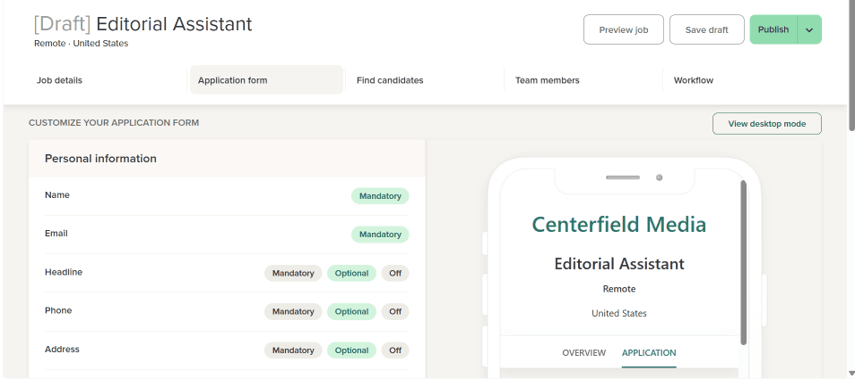
Workable

Workable allows you to customize what your application form looks like to applicants. You can toggle which fields are mandatory, optional or included at all to make sure you’re only getting the information you really need to make a decision. In our test pictured above, we designed an application for an editorial assistant working remotely.

Its sourcing capability is strong, as well. Workable searches a pool of more than 400 million profiles for passive candidates, resurfaces people who applied for earlier roles when a relevant opening appears, runs social campaigns and connects to Indeed Easy Apply, Apply with LinkedIn and LinkedIn Recruiter System Connect. Compliance support covering EEO, OFCCP and CCPA, along with GDPR automation, is part of the base product as well, which wasn’t always the case with job posting sites we reviewed—many gate them behind an expensive Enterprise tier.

It is also one of the few platforms in this category that will tell you its price without a phone call. That transparency is a genuine advantage while you are building a shortlist. The downside is that Workable is pretty expensive at $299 per month. That price point may be justifiable for a fast growing company that needs to make a lot of hires, but for a one-off hire for a small team, it’s probably not worth it.

Workable’s pricing scales based on how many employees you have, not by how many roles you are filling or how many people log in. The rates below cover the one-to-20 employee band on annual billing, the least expensive position in Workable’s grid. The company publishes nine headcount bands, from one to 20 up through 1,000 and above.

PlanAnnual priceMonthly optionWhat separates it
Standard$3,588 ($299 per month)$360 per monthTexting, video interviews and assessments are paid add-ons
Premier$7,188 ($599 per month)Not availableTexting, video interviews, assessments and referrals included
Enterprise$8,628 ($719 per month)Not availableAdds custom report building and extra permission sets

On the 801 – 1,000 employee band, the highest band with published pricing, the Standard plan increases to $2,799 per month; Premier costs $3,959 per month; and Enterprise costs $4,749 per month. Companies with more than 1,000 employees will need to contact Workable for a quote.

Add-Ons

On the Standard plan, texting runs $89 a month, video interviews $109 and assessments $59, with performance and engagement adding $39 on the HR side. Those features are included with the Premier and Enterprise.

Workable Agent, the AI sourcing and screening layer, bills in credits. Paid accounts receive 3,000 to begin with, and the agent consumes one credit to evaluate a candidate, two to source a passive one and 10 to run a candidate chat. Top-ups cost $0.12 per credit in a 5,000 pack ($600), $0.10 in a 10,000 pack ($1,000) and $0.095 in a 50,000 pack ($4,750). Unused credits expire after a year and are not refundable.

The free trial runs 15 days with the full Standard feature set and no card required. Cancelling drops the account to a free plan where you cannot post jobs or contact candidates and can only view records for people already in the system.

  • Published pricing lets you compare Workable against alternatives before entering a sales process.
  • One subscription covers both distribution to 200-plus boards and end-to-end applicant tracking.
  • The 15-day trial delivers the complete Standard feature set without a credit card.
  • Pricing starts at $299, which is expensive compared to other job sites in our review.
  • Headcount-based pricing means company growth raises your bill even when hiring volume is flat.
  • Texting, video interviews and assessments are extras on Standard rather than included features.

Workable’s TrustRadius score is 7.3 out of 10 from 86 reviews, among the fewest reviews we found during our research.

Users are consistently positive about the interview feedback tools, candidate search, single-click board publishing and an interface hiring managers absorb quickly without formal training.

Criticism focuses on cost; reporting and data visualization that reviewers find less intuitive than the rest of the product; and unreliable duplicate detection, with several noting that one person applying to two roles shows up as two candidates. Searching archived postings and resumes also drew repeated complaints.

Handshake logo
Editor's Rating: 8.2/10

Early-career hiring is where big general boards usually fall flat. That’s where Handshake comes in. The platform reaches more than 25 million verified candidates through the career centers of colleges and universities, and posting a standard job costs nothing. Handshake’s own advice to employers is to begin with the free posting and add capability as the team grows, which is a fair description of how a small company should approach it.

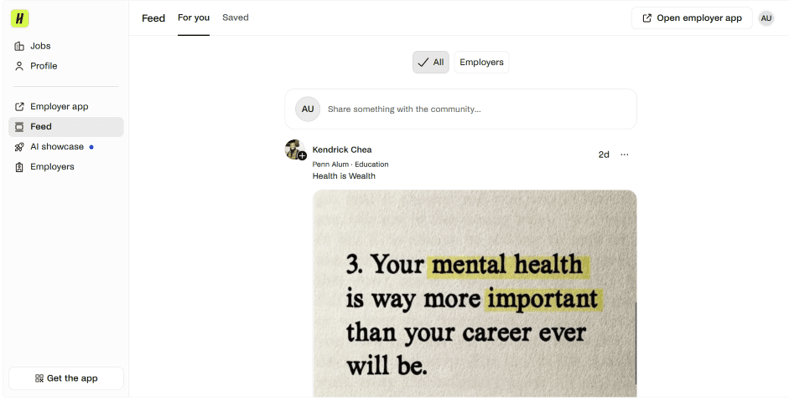
Handshake social network

An interesting feature Handshake offers is its own built-in social network, much like LinkedIn. Personally, I’m not sure if I need more social media in my life, but this did seem like a unique way to foster connections between candidates and employers—it’s like the LinkedIn Jobs of the higher education space.

It has outgrown the campus bulletin board it started as. Handshake now runs AI matching that surfaces candidates while leaving every hiring decision with you, consolidates roles, applicants and school relationships into one workspace, maintains employer brand presence that follows candidates as their careers progress, and reports on campaign performance as it happens.

Standard postings are free. The paid tiers, which add targeted campaigns and richer employer branding, carry no published price and require contacting the company.

Postings go to the schools you select and appear only once those institutions approve them. Messaging students is also gated; you need at least one job approved by an institution before contacting its students, and at schools participating in the Handshake Open program you need approval from at least 10 partner schools first.

Plan for calendar time rather than expense. Reading through Handshake’s employer documentation, verification and approval came up more often than money. This makes sense for a platform providing access to students; we expect them to vet companies thoroughly before connecting them. But it is something you should plan ahead for.

  • Free standard postings reach more than 25 million verified early-career candidates.
  • Hand-reviewed employer validation and school approval keep the pool credible for employers and students alike.
  • Targeting by school, program and graduation year is something general boards cannot reproduce.
  • Employer verification and school-by-school approval delay your first live posting.
  • Contacting students requires approved postings, and at Handshake Open schools that means clearing at least 10 partner institutions.
  • Paid tiers are unpriced publicly, and the platform is the wrong tool for experienced or senior roles.

The Handshake Talent Engagement Suite scores 8.0 out of 10 on TrustRadius from 71 reviews, the smallest sample on this page.

Employers running early-career programs describe dependable access to candidates across a wide set of universities, simplified career fair registration and posting, and campaign features that let them speak to students directly and establish brand presence before recruiting season.

The recurring complaint is filter precision, with reviewers reporting that graduation year, major and location filters miss, sending campaigns to students outside the intended audience.

How job posting pricing works

Job posting sites offer a few different billing structures. They can produce similar monthly totals, but it’s good to understand which you’re dealing with before signing up so you can better control your spend.

Free postings

Indeed, LinkedIn and Handshake all publish openings at no charge. However, unpaid listings rank below sponsored ones and easily lose visibility as new jobs are posted on the platform. A role with light competition and a flexible timeline is a good candidate for free posting. An urgent or contested opening usually is not.

TipTip
Consider these alternatives to Indeed before you decide to spend to promote a post. They can be used in combination with or instead of the well-known job posting site.

Per-interaction billing

This is how Indeed and LinkedIn sell visibility. You nominate a budget and spend begins when candidates click or start applications. LinkedIn will not charge past the total you set for a job, so you control the maximum you’ll be charged. The risk is that you are buying attention, not results, so it is possible to spend a full budget and hire nobody. This model rewards employers who watch a campaign daily and punishes those who set it and forget it.

Per-slot subscriptions

ZipRecruiter’s approach charges a flat rate to keep a job live, with no adjustment for click or application volume. Your cost is knowable in advance and a wildly popular listing does not generate a larger invoice. The downside is that a listing nobody engages with costs the same as one that results in a new hire.

Headcount subscriptions

Workable bills on company size rather than hiring activity. Budgeting becomes trivial and the economics work well if you are hiring continuously, but a company that fills two roles a year pays the same rate as one filling 40, and the bill climbs as you add employees.

Whichever structure you pick, add the screening hours to the total. Someone on your team is going to need to review applications, conduct interviews and, hopefully, onboard your eventual hire. That all costs something beyond what you pay the job posting site.

Key TakeawayKey takeaway
The advertising is rarely the biggest expense in a job board hire. A sponsored opening in a major metro can pull 200 applications, and at five minutes each that is close to 17 hours of somebody’s week. Before you increase a posting budget, confirm you have the hours to process what it brings in.

Matching the platform to the role

Just like trying to reach your target customers, consider whether a job posting platform reaches your target employees. Just because a site has massive reach, doesn’t mean it will reach the right people for your open roles.

  • General boards: Indeed and ZipRecruiter suit openings with broad appeal, including administrative, customer service, retail, warehouse and most entry-level positions. Both will produce volume, so you’ll need someone prepared to screen it.
  • Professional networks: LinkedIn is the realistic route to salaried, credentialed and management candidates, and the only one that reaches people not currently looking. It is a poor investment for hourly and industrial hiring.
  • Trade and industry boards: Sector-specific sites deliver far fewer applications but a much higher proportion of relevant ones. Use one alongside a general board rather than in place of it.
  • Campus networks: Handshake and comparable platforms reach students and recent graduates through their institutions, with filtering by school, program and graduation year that no general board offers. This option is good for internships and for employers prepared to train.
  • Search aggregators: Google Jobs pulls structured listings from career pages and boards, but does not take direct submissions. You get there by publishing with correct structured data elsewhere, or by using a platform that syndicates on your behalf.
  • Applicant tracking systems: Workable and its peers distribute to hundreds of boards and then run the pipeline. This is the right choice when you have limited capacity to screen large numbers of applicants.
TipTip
A trade or industry board will send you a fraction of the applications a general board does, but a higher share of them will be worth reading. Candidates searching a sector-specific site have already narrowed themselves into your field. Twelve applicants from a niche board frequently beat 200 from a broad search.

Writing a posting that filters for you

The platform you choose determines how many people see the opening, but your job posting decides how many of the right ones apply. These seven steps are the part of the process you control directly.

1. Settle the role before you write a word

Work out what this person does in their first three months, which capabilities are mandatory versus nice to have, and what the position pays. If you’re general or vague in this step, it will be hard to attract qualified candidates. Know what you’re looking for before you start looking for it.

2. Title it the way a candidate would search it

People search by job title. An internal designation like “Senior Wordsmith” that nobody outside the company would search for will not surface. Use the searchable version in the posting and keep the internal one for the offer paperwork.

3. State the pay range

A growing number of states require employers to publish pay ranges, and it screens your applicant pool at no cost. According to a report from ResumeLab, four out of five candidates won’t even bother applying to a job that doesn’t publish pay ranges. Leaving salary out attracts people you cannot pay and repels people you can.

4. Write to the candidate

Open with what the person will actually do and why it matters, then get to requirements. Confine the requirements list to things that would genuinely disqualify someone, since long lists deter the conservative self-assessors you would want to interview.

5. Attach screening questions

Nearly every platform lets you add disqualifying questions covering credentials, availability, location and work authorization. This is the highest-return task in the whole process and can make the difference between reviewing 40 applications and 200.

6. Post narrowly, sponsor selectively

One general board plus one targeted channel beats publishing everywhere. Reserve sponsorship for roles that are urgent or genuinely contested, and set a total budget rather than an open-ended daily one.

7. Decide who replies, before you publish

Good candidates are almost always in more than one conversation. A prompt reply from an actual person converts them more reliably than additional ad spend, and improving your hiring and recruitment process starts with naming who owns that reply.

Other platforms worth knowing about

Monster and CareerBuilder

Both  warrant a caveat. Their parent company went into Chapter 11 in June 2025. A Delaware bankruptcy judge later signed off on selling the job board operation to BOLD, which took the brand names with it and extended offers to at least 350 of the staff.

Both sites run today under that new owner. We left them out of our top five because an ownership transition is a difficult thing to recommend to an owner making one consequential hire. But both products still work and are viable options if you want to use them.

SimplyHired

Another Recruit Holdings property, SimplyHired aggregates listings and can serve as an inexpensive supplement, though its inventory substantially overlaps Indeed’s.

Dice

The long-standing destination for technology roles, and worth trying when a general board is not surfacing engineers.

Snagajob

Now owned by JobGet and focused on hourly and shift work, which is the clearest gap in our five picks. Worth a look for restaurant, retail and service scheduling roles.

How to choose a job posting site

Identify the role first

Ask yourself where somebody currently doing this job would be looking, and choose backward from there. Our guide to recruiting new employees works through that question in more detail.

Diagnose reach versus volume

If you publish and hear nothing, buy audience: distribution, matching, passive sourcing. If you publish and cannot keep up, buy filtration: screening questions, better search, applicant tracking. Employers spend against the first problem far more often than they actually have it.

Fit the billing model to your hiring rhythm

Sporadic, unpredictable hiring favors per-slot or per-day pricing where you pay only while a role is live. Continuous hiring favors a subscription. Per-interaction billing suits whoever will actually monitor the campaign.

Get the number in writing

Two of our five picks quote privately. Ask for the figure in writing, establish what happens at the end of any trial and check the cancellation terms, since several platforms in this category roll trials into paid subscriptions automatically.

FYIDid you know
Two of our five picks do not publish rates at all, which is normal in this category rather than a red flag. It does mean you should get any quote in writing, ask specifically what the price becomes when a trial converts, and read the cancellation terms before entering payment details.

Pilot one role before standardizing

Run a single opening on your front-runner and track two figures separately: applications per dollar and qualified applications per dollar. Let the second one decide. Raw volume tells you almost nothing about whether a platform works for your business.

Methodology

Locating the Best Services

We assembled our initial list of 18 platforms from three sources: the job posting sites small business owners most often ask us about, the platforms that appear repeatedly in employer discussions of hiring costs, and the applicant tracking systems that include job board distribution as a standard feature rather than an upgrade. We deliberately cast the list wider than general job boards to include professional networks, campus recruiting platforms and distribution-capable applicant tracking systems. We then confirmed the current corporate status and ownership of every platform on the list before evaluating any of them, a step that removed two familiar names from consideration this year.

Choosing the Best Services

To narrow our list, we prioritized two questions above all others: does this platform’s candidate pool contain people who perform the work our readers are hiring for, and can an owner find out what it costs before committing? Candidate reach and relevance and pricing transparency each carried a quarter of the weight in our scoring. The presence of a usable free option and the quality of screening and application management tools each carried 15 percent, on the reasoning that applicant volume without filtering simply relocates the cost to whoever reads resumes. Distribution breadth and integrations, and support and onboarding, each accounted for the final 10 percent. We also required that our five picks cover different use cases rather than five variations on the same general board.

Researching Each Service

Our research ran primarily against live pricing pages, plan comparison grids, employer help centers and product documentation. We took that approach after establishing that third-party pricing information in this category is unreliable, having found summaries quoting a plan the vendor’s own help center identifies as legacy and closed to new customers, and figures for the same named tier that varied by more than $60 per month between sites. Where a company does not publish rates, we report that rather than estimating. Where a company makes a performance claim about its own product, we attribute it to the company instead of presenting it as our finding. We supplemented vendor documentation with verified employer reviews on third-party platforms, and with primary labor market and court records where the corporate history of a platform was relevant.

Analyzing Each Service

Scoring each platform, we read its pricing model for what event triggers a charge and who absorbs the loss when a posting generates traffic without a hire, since that single mechanic separates otherwise similar products. We compared published rates against the add-ons required to reach a usable feature set, which in one case raised the effective cost of an entry plan by nearly $300 per month. We read employer reviews for patterns rather than sentiment, and we report each platform’s review count alongside its score, because a strong average from a few dozen reviews carries less weight than a slightly weaker one from several hundred. We also tested each platform by creating a draft job for a hypothetical open role. We spent time navigating each site, getting a feel for what it’s like to use the platform as an employer, and factored our qualitative experience into the quantitative criteria listed above.

Frequently asked questions

Yes, on several platforms. Indeed allows up to three free organic postings, LinkedIn permits one free job at a time, and Handshake offers free standard postings to a pool of more than 25 million verified early-career candidates. In each case the listing is real and the applications are yours to keep. The trade-off is placement rather than payment: free postings sit below sponsored ones and lose ground as newer listings appear, which makes them better suited to a role you can afford to fill slowly.

ZipRecruiter spreads a single posting across more than 100 job sites in one action, including Google Jobs and industry boards, and its matching technology invites suitable candidates rather than waiting to be found. Indeed offers the largest audience on any single site and now carries Glassdoor’s traffic as well. On either platform, paying for placement materially changes results, so an urgent opening should be budgeted for sponsorship rather than left to organic reach.

Between nothing and several hundred dollars a month per role. Indeed, LinkedIn and Handshake all post for free. Workable publishes rates beginning at $3,588 a year for Standard at the one-to-20 employee band, with a $360 monthly option. ZipRecruiter and Handshake’s paid tiers are quoted privately. Indeed and LinkedIn charge against a budget you set, billed when candidates click or begin applying. Whatever the model, the hours your team spends reading applications usually exceed the advertising spend, and estimating the cost of hiring an employee properly means counting both.

Through resume databases and passive sourcing, which most platforms sell separately from job posting. ZipRecruiter’s resume database covers 56 million-plus profiles, which you can filter by skill, background and geography, and it takes on close to 230,000 new candidates every month. It requires Premium or higher. Workable includes passive sourcing across more than 400 million profiles. LinkedIn Recruiter remains the standard tool for approaching employed professionals and is licensed separately from job posting.

It depends on which end of the funnel is failing. If postings are not generating enough applications, a job board with strong distribution and candidate matching is the right purchase. If applications arrive and then stall in an inbox while good candidates accept other offers, an applicant tracking system like Workable addresses the actual problem. Businesses that need both frequently start with a free posting on a general board and add tracking once they are running more than two or three searches at a time, and some find that the best PEO services or an HR platform covers the tracking need as part of a broader package.

Did you find this content helpful?
Verified CheckThank you for your feedback!
author image
Written by: Adam Uzialko, Senior Editor
Adam Uzialko, senior editor of Business News Daily, is not just a professional writer and editor — he’s also an entrepreneur who knows firsthand what it’s like building a business from scratch. His experience as co-founder and managing editor of a digital marketing company imbues his work at Business News Daily with a perspective grounded in the realities of running a small business. At Business News Daily, Adam covers the ins and outs of business technology, such as iPhone credit card processing, POS systems, CRMs and remote-work tools, while also sharing best practices for everyday operations. Since 2015, Adam has also reviewed hundreds of small business products and services, including contact center solutions, email marketing software and text message marketing software. Adam uses the products, interviews users and talks directly to the companies that make the products and services he evaluates. Additionally, he often specializes in digital marketing topics, with a focus on content marketing, editorial strategy and managing a marketing team.